Kling AI Remove Watermark: 3 Ways to Get Clean Videos in 2026
Knowing how to properly handle the Kling AI remove watermark process can save you hours of wasted effort and help you get polished, publish-ready video content every time.This guide covers exactly what your options are — and introduces a powerful free alternative for when the watermark simply isn't worth dealing with.
Why Kling AI Remove Watermark Frustrates So Many Creators
Kling AI has quickly become one of the most impressive AI video generation platforms available — producing cinematic-quality clips from simple text prompts or reference images. But there's a catch that stops countless creators in their tracks: every video generated on the free tier comes stamped with a prominent Kling AI watermark, making the output unusable for professional, commercial, or even personal publishing without further action.
The Real Problems Kling AI Remove Watermark Cause
The watermark isn't just a minor cosmetic inconvenience. For real creators and businesses, it creates meaningful workflow blockers:
- Unpublishable content: Brand videos, client deliverables, or social media posts with a visible watermark look unfinished and amateurish — they simply cannot go live as-is
- Costly upgrade pressure: Removing the watermark requires a paid subscription; for creators who only need occasional video output, this cost-per-use equation rarely makes sense
- Post-processing workarounds fail: Attempting to crop, blur, or cover a watermark after the fact degrades video quality, distorts aspect ratios, and often still looks obvious to viewers
- Platform rejection risk: YouTube, Instagram, and TikTok's monetization and brand partnership programs strongly discourage watermarked content, which can affect reach and eligibility
- Time wasted on unusable exports: Generating a great video only to find it unusable without paying removes the core value proposition of "fast, free AI video creation"
These frustrations push many creators to search for smarter paths forward — either within Kling AI or through alternative tools.
How to Kling AI Remove Watermark: Your Options Explained
There is no third-party tool that can cleanly remove the Kling AI watermark without visibly degrading your video. The most reliable approaches all fall into one of three categories:
Option 1: Upgrade to a Kling AI Paid Plan
The most direct path is upgrading your Kling AI account to a paid subscription tier. Once subscribed, watermarks are automatically removed from all generated videos and future exports come clean. This is the right choice if you use Kling AI heavily and want access to its full feature set — longer clips, higher resolution, and priority generation — alongside watermark-free output.
Option 2: Use Kling AI's Free Watermark Removal Tokens
Kling AI occasionally offers free video generation credits or promotional access to watermark-free exports through seasonal campaigns, referral programs, or task-based reward systems within its platform. If you only need clean output occasionally, monitoring these opportunities can get you watermark-free videos without a full subscription commitment. Check the Kling AI rewards and activity center regularly for active promotions.
Option 3: Switch to a Free, Watermark-Free AI Video Platform
For many creators, the most practical solution isn't working around Kling AI's paywall at all — it's using a platform that never adds watermarks in the first place, even on the free tier.
Banana Pro AI Studio is one of the strongest examples of this approach. It's a completely free, browser-based visual workflow canvas that supports AI video generation with Veo 3 and Veo 3.1 models — the same generation technology powering some of the highest-quality AI video outputs available today. Critically, all exports from Banana Pro AI Studio are high-resolution and completely watermark-free, even on the free plan. No subscription is required, and no credit card is needed to sign up.
Create Watermark-Free AI Videos with Banana Pro AI Studio
If you're ready to move to a tool where watermarks are never a concern, here's exactly how to get started:
- Open the Studio — Visit Banana Pro AI Studio in any browser. Sign up free with no credit card required to access your personal infinite canvas workspace
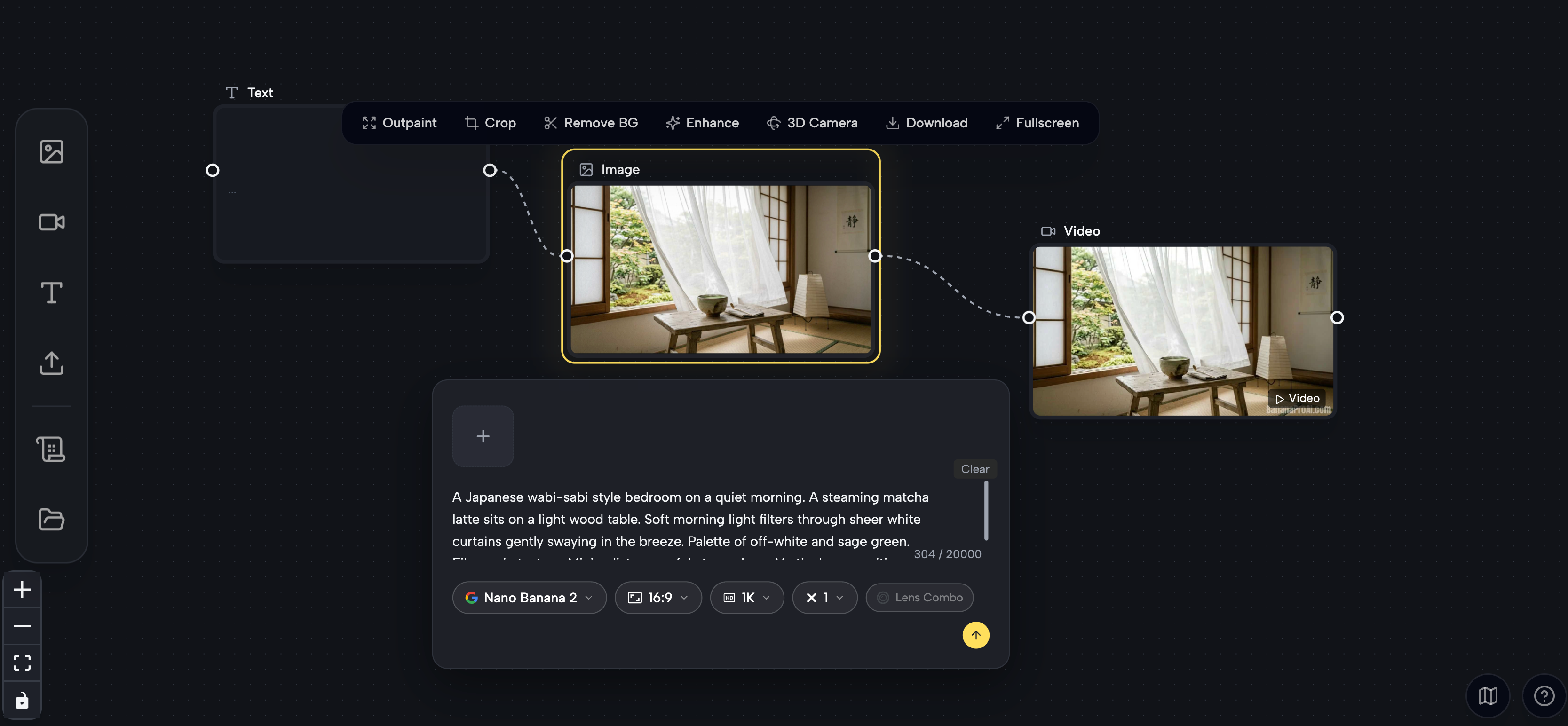
- Create a new project — Click "New Project" from the dashboard to open the visual canvas, where every node, output, and connection is auto-saved in real time
- Add a Video node — Drag a Video generation node onto the canvas from the sidebar; select your preferred model — Veo 3.1 Premium for top-tier quality, or Veo 3.1 Basic for faster results at lower credit cost
- Write your prompt — Add a Text node, type your video description, and connect it to the Video node; for more precise control, first generate an Image node and chain it into your Video node as a reference frame
- Generate and preview — Hit Generate and preview your video directly on the canvas in seconds; not satisfied? Adjust the prompt, switch models, or use "Based on This" to iterate without starting over
- Export watermark-free — Download your final video in full resolution with zero watermarks — ready to publish immediately on any platform or deliver to any client
Kling AI Remove Watermark vs. Banana Pro AI Studio
| Feature | Kling AI (Free Tier) | Banana Pro AI Studio |
|---|---|---|
| Watermark on free exports | Yes | ** Never** |
| Free plan available | Yes (limited) | Yes — full features |
| Credit card required | No | No |
| Video generation models | Kling proprietary models | Veo 3 & Veo 3.1 |
| Image generation | Limited | 9+ models (GPT-4o, Flux Kontext, etc.) |
| Visual workflow canvas | No | Yes — infinite canvas |
| Commercial use rights | Paid plans only | Yes, free tier included |
| Best for | Kling-specific cinematic style | Watermark-free, multi-model workflows |
Both tools serve different creative needs — Kling AI excels at its proprietary cinematic video style, while Banana Pro AI Studio delivers broader model access, a more flexible visual workflow, and genuinely watermark-free outputs at zero cost.
Start Kling AI Remove Watermark Freely
The kling ai remove watermark problem ultimately comes down to a simple question: how much of your creative workflow do you want to spend managing platform limitations rather than making content? For users committed to Kling AI's specific aesthetic, upgrading to a paid plan is the cleanest path forward. But for any creator who wants professional, publish-ready AI video without watermarks and without a subscription, a free tool like Banana Pro AI Studio removes that obstacle entirely.
If you want to generate AI videos and images that are watermark-free from the very first export — no hidden fees, no workarounds — open Banana Pro AI Studio free today and experience what creative AI tools should feel like.