AI Body Editor Online Free: How to Reshape Your Body Photo in Seconds (2026 Guide)
Looking for a free AI body editor that actually looks realistic? Whether you're a fitness coach, content creator, fashion designer, or just someone curious about a new silhouette — this guide walks you through BananaPro AI Body Editor, one of the most advanced reshape body editor online free today.
What Is the BananaPro AI Body Editor?
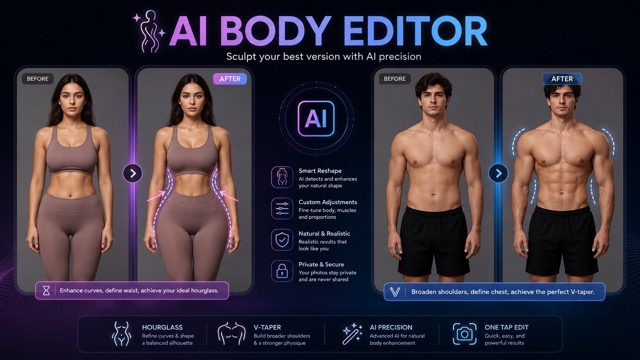
The AI Body Editor by BananaPro AI is a free online tool powered by Nano Banana Pro AI model and GPT Image 2 AI model. It specializes in realistic full-body reshaping — specifically:
- Female Hourglass mode — enhances waist definition, balances hip curvature and torso length
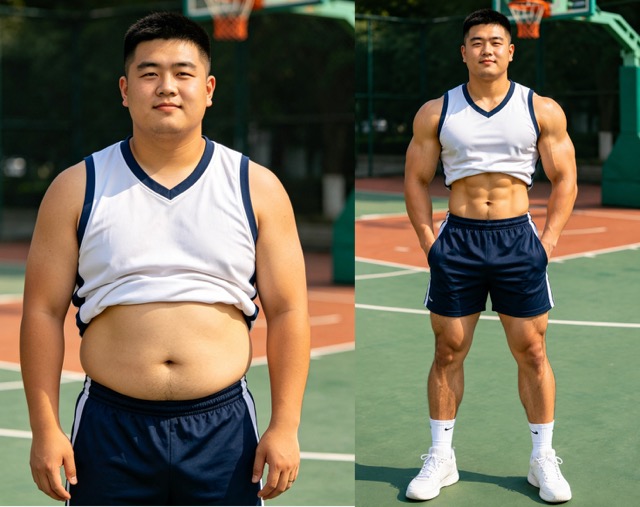
- Male V-Taper mode — broadens shoulders subtly while refining the waistline for a gym-inspired silhouette.
- Dual Reshape mode — designed for couple photos, allowing you to reshape both people at once for a more balanced and coordinated look.
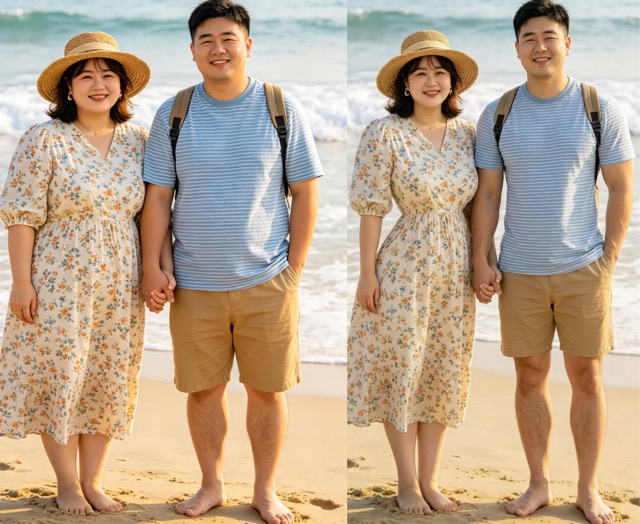 Unlike basic "slim filters" or Photoshop liquify tools, this reshape body editor AI doesn't just stretch pixels.
It uses skeletal structure detection, body segmentation, and anatomical geometry modeling to produce results that look photographically real — preserving your face, clothing folds, lighting, and background completely intact.
No sign-up required. No app download. Works directly in your browser.
Step-by-Step: How to Use AI Body Editor
Here's a complete walkthrough of the reshape body editor AI, so you get the best results.
Step 1: Prepare Your Photo
Before you upload anything, photo quality matters a lot. Here's what works best:
✅ Do use:
- A clear, front-facing full-body standing photo
- Natural lighting (avoid heavy shadows across the body)
- Visible posture — shoulders, waist, and legs clearly shown
- Casual clothing, athletic wear, or fashion outfits all work
❌ Avoid:
- Cropped or close-up shots (the AI needs the full body to detect proportions)
- Heavily obstructed poses (e.g., crossed arms hiding the waist)
- Blurry or low-resolution images
- Very busy backgrounds (though the background is preserved, clean backgrounds improve accuracy).
Step 2: Upload Your Image
Go to BananaPro AI body editor. You'll see a simple drag-and-drop upload area. Either:
Drag and drop your file directly onto the area, or Click to select from your device
Step 3: Choose Your Reshape Mode
This is where you direct the transformation:
- Female mode → Hourglass reshape
The AI enhances waist definition while balancing hip curvature and torso length. It calculates proportional harmony so the result looks authentic — not cartoonish or exaggerated.
- Male mode → V-Taper reshape
The AI broadens shoulders subtly while refining the waistline. It analyzes collarbone alignment and torso angles before adjusting. The result is a confident, gym-trained aesthetic without artificial stretching.
- Dual Reshape mode.
This mode is work for group photo with couple. It will reshape bodies based on different genders.
Frequently Asked Questions
- Is the AI Body Editor really free?
Yes, the reshape body editor is available to use for free online. Premium tiers exist for higher resolution and more generation credits, but basic reshaping is accessible without paying.
- Will my face or background change?
No. The AI body editor uses segmentation masks to isolate only the body zones being reshaped. Your face, hairstyle, background, and even clothing details remain intact.
- Can it process couple or group photos?
Yes. The reshape body editor AI can detect multiple subjects and apply proportional adjustments independently, preserving relative height ratios between people.
- Is my photo stored or shared?
Your images are processed securely and are not stored permanently. The reshape body editor tool does not share or reuse personal images.
- What if the result looks slightly unnatural?
Try a higher quality source photo with better lighting and a more neutral standing pose. Also try generating 3–4 variations at once — one is usually noticeably better than the others.
Final Words
The BananaPro AI Body Editor is genuinely one of the most technically impressive free reshape body editor online free.
What sets it apart isn't the concept — it's the execution quality: the lighting physics, the identity preservation, the fabric behavior.
Try the AI Body Editor free at BananaPro AI.