How to Make the Viral Stadium Broadcast Video Using AI (Tutorial)
AI baseball trend videos are quickly becoming one of the most eye-catching creative trends online. This guide will show you how the trend works, what makes the result realistic, and how to create your own AI baseball trend video step by step.
If you've been scrolling through TikTok, Instagram Reels, or X lately, you've probably noticed a stunning new AI baseball trend flooding your feed — hyper-realistic videos of beautiful fans "caught on camera" inside a packed Korean baseball stadium.
This guide will show you exactly how to ride the AI baseball trend wave and create your own AI Korean baseball video using BananaPro's all-in-one AI baseball trend tool — no editing skills required.
What is AI Baseball Trend?
The AI baseball trend lets you recreate that viral "caught on camera" moment — the kind of candid stadium shot that stops people mid-scroll.
Upload a photo, run it through an AI baseball trend tool, and out comes a hyper-realistic image of you in the KBO crowd, looking like you just accidentally became the highlight of the evening broadcast.
No stadium ticket. No editing skills. Just you, an AI baseball trend tool, and 30 seconds.
Why BananaPro is the Best AI Baseball Trend Tool?
Most tutorials tell you complicated steps or to piece together three or four different apps to create your AI Korean baseball video.
BananaPro AI baseball trend tool changes that entirely.
It's a purpose-built, two-step platform that takes you from a simple photo to a shareable stadium broadcast video — all without leaving the site.
What You'll Need Before You Start
To get the most out of this AI baseball trend tool, prepare the following:
- A clear photo of yourself (or any subject you want to place in the stadium). Frontal shots with good lighting work best.
- A BananaPro account — free to sign up with Google, with free credits included on registration.
That's it. BananaPro AI baseball trend tool handles the rest in two clicks.
Step-by-Step Tutorial — Create Your AI Korean Baseball Video
Here's the full walkthrough to produce your own stadium broadcast video using BananaPro AI baseball trend tool.
Step 1: Generate Your Stadium Crowd Image (Image to Image)
- 1️⃣ Go to AI Korean baseball photo tool. This is BananaPro's dedicated AI Korean baseball video image generator — powered by image-to-image AI technology. Here's how to use it:
- 2️⃣ Upload your photo — click the upload button and select your reference image.
- 3️⃣ Click Generate — the AI baseball trend tool will produce a hyper-realistic stadium crowd image in seconds.
Step 2: Turn Your Image Into a Stadium Broadcast Video
- 1️⃣ Go to AI baseball trend video tool This is where BananaPro AI baseball trend tool truly shines — it animates your still image into a fully realized stadium broadcast video with one click.
- 2️⃣ Upload the image you just generated from Step 1.
- 3️⃣ Click "Generate Video" — the AI baseball trend tool will animate your photo with realistic crowd movement, subtle body motion.
- 4️⃣ Download your stadium broadcast video — ready to post directly to TikTok, Instagram Reels, X, or YouTube Shorts.
Custom Prompts — Personalize Your Stadium Broadcast Video
One of the most powerful features of BananaPro AI baseball trend is how customizable it is.
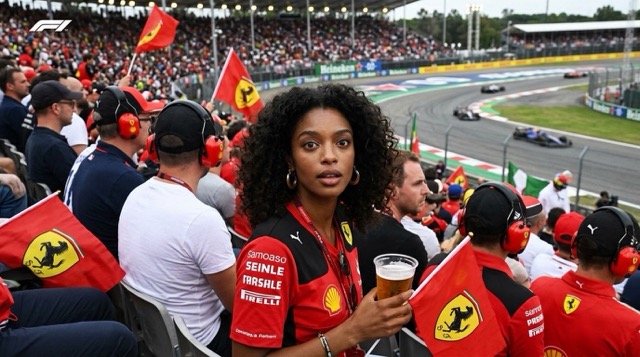
You're not limited to Korean baseball — you can recreate the same viral "caught on camera" aesthetic across any sport, any team, any stadium in the world.
Here are ready-to-use prompts you can drop directly into the AI image generator and chose image to image mode:
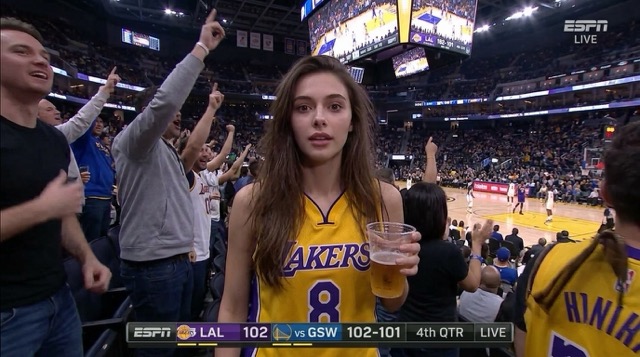
Realistic sports broadcast screenshot-style documentary photo set in the spectator stands of an 【NBA basketball game】. The uploaded person is captured naturally by a live broadcast camera from a **frontal angle**, sitting in the crowd at an 【NBA game】. The reference person is positioned **centered in the frame**, facing forward toward the camera. The person wears a casual 【Los Angeles Lakers】 jersey and sits comfortably while watching the game, holding a 【beer cup】 and cheering item nearby. Portable fan, other spectators, and cluttered stadium details around the seat. Expression feels unintentionally caught on camera — curious, distracted, slightly surprised. Interlaced live TV quality, soft focus from zoom lens, uneven stadium lighting. Realistic live sports broadcast frame. NO beauty retouching, NO enlarged eyes, NO V-line jaw, NO porcelain skin, NO influencer vibe, NO magazine photoshoot, NO AI beauty look. NOT a model shoot, NOT influencer photography, NOT beauty photography. Slightly awkward candid posture, natural facial asymmetry, realistic skin texture with visible pores, flyaway hair, oily skin shine from humidity, mild motion blur, compression artifacts, interlaced live TV quality, soft focus from zoom lens, uneven stadium lighting.
Custom Jersey / Any Sport
Replace 【team name】 and 【sport】 in any prompt above to match your preferred team or player — the AI baseball trend tool at BananaPro supports a wide range of styles and uniforms.
FAQ About the Korean Baseball Trend
Q: Is BananaPro AI baseball trend tool free to use?
A: Yes! BananaPro offers free credits upon sign-up, so you can jump into the AI Korean baseball video trend. Simply check in daily to get more free credits— the more consecutive days you log in, the more credits you earn to keep generating stadium broadcast videos.
Q: Do I need any design or video editing experience?
A: None at all. BananaPro AI baseball trend tool is designed for one-click creation. If you can upload a photo and click a button, you can create a professional-looking stadium broadcast video.
Q: Can I use my own photo or someone else's?
A: You can use your own photo freely. For photos of others, always ensure you have their consent before generating and publishing an AI Korean baseball video with their likeness.
Q: How long does the stadium broadcast video generation take?
A: Typically under 60 seconds per step. The full two-step process — image generation plus stadium broadcast video creation — usually takes 2–3 minutes from start to finish.
Q: Will my stadium broadcast video look real?
A: Yes — that's the core strength of this AI baseball trend tool. The outputs are engineered to mimic live TV broadcast aesthetics: telephoto compression, broadcast overlays, crowd depth, and natural subject behavior. Most viewers can't tell the difference at a glance.
Final Words.
The AI baseball trend is one of the fastest-moving viral moments these days.
BananaPro's two-step workflow — image-to-image stadium generation, followed by one-click stadium broadcast video creation — is the simplest, fastest way to join this trend and publish something that genuinely looks broadcast-quality.
Ready to create your AI Korean baseball video?
👉 Start with the image generator here.
👉 Then make your stadium broadcast video here.