ChatGPT Trending Prompts: 50+ Viral AI Photo Ideas
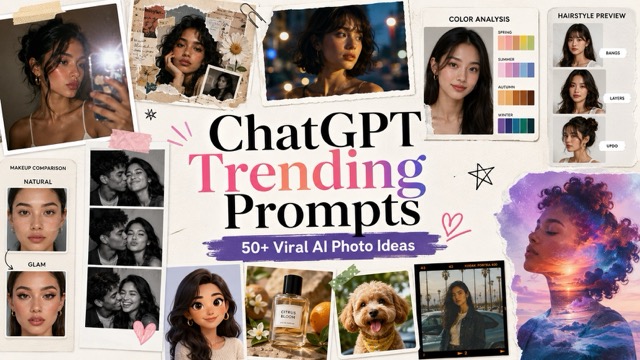
Discover the best ChatGPT trending prompts for creating Instagram-style photos, AI collages, cinematic portraits, color analysis, hairstyle previews, makeup looks, avatars, product shots, pet edits, and creative social media images.
What Are ChatGPT Trending Prompts?
ChatGPT trending prompts are ready-to-use text instructions that tell an AI image tool how to edit or generate a photo. A good prompt usually explains the subject, style, lighting, background, colors, mood, and final use case.
A weak prompt is too general:
Make this photo look better.
A stronger prompt is more specific:
Transform the uploaded portrait into a high-contrast Instagram flash photo with direct camera flash, glossy skin highlights, deep background shadows, natural facial details, and a trendy night-out aesthetic.
The more specific your prompt is, the easier it is for AI to create the result you want.
Why ChatGPT Trending Prompts Are Popular
| Reason | What It Means |
|---|---|
| Easy to use | No advanced editing skills required |
| Fast results | Create social-ready images in seconds |
| Style control | Choose flash, collage, cinematic, retro, beauty, avatar, or product styles |
| Better consistency | Clear prompts help AI understand the final look |
| Social media friendly | Great for Instagram, TikTok, Pinterest, YouTube thumbnails, and profile photos |
How to Use ChatGPT Trending Prompts
Step 1: Upload Your Photo
Choose a clear selfie, portrait, outfit photo, couple photo, product photo, pet photo, or lifestyle image. A clean photo with visible face, clothes, and background usually gives better results.
Step 2: Copy a Prompt
Pick a prompt from the categories below. You can edit details such as lighting, background, clothing, color style, image ratio, or final platform.
If you want more prompt inspiration after trying these examples, check the full GPT Image Prompt Guide for more image prompt styles, editing ideas, and ready-to-copy examples.
Step 3: Generate and Download
Paste the prompt into BananaPro AI Image or another AI image editor, generate the result, and download the final image for posts, stories, profile pictures, thumbnails, creative references, or marketing content.
Best ChatGPT Trending Prompts by Category
1. Instagram Flash Effect Prompts
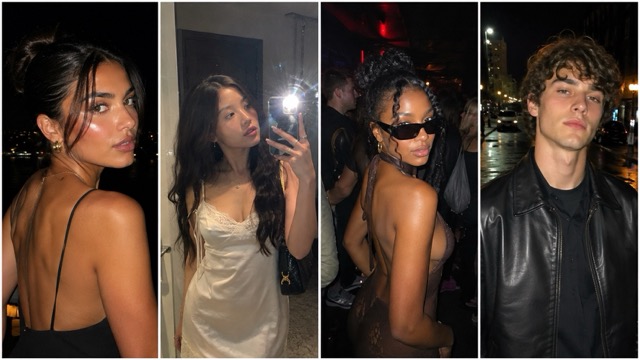
Instagram flash effect prompts are popular because they make ordinary photos look like direct-camera flash shots. They work well for selfies, portraits, outfit photos, party photos, and night street images.
| Prompt Type | Best For | Copyable Prompt |
|---|---|---|
| Night-Out Flash Portrait | Selfies, party photos, Instagram posts | Transform the uploaded portrait into a trendy night-out flash photo. Keep the person’s face, hairstyle, outfit, and pose natural. Add realistic direct camera flash, bright highlights on the face, deeper background shadows, crisp contrast, glossy skin texture, and a clean Instagram flash effect style. Make the result look like a modern party photo taken with a phone camera flash. |
| Mirror Selfie Flash | Outfit photos, stories, mirror selfies | Turn the uploaded mirror selfie into a high-contrast Instagram flash photo. Keep the outfit, phone, pose, room, and body shape unchanged. Add strong but realistic phone flash lighting, sharper clothing details, deeper wall shadows, clean skin highlights, and a stylish social media look. Make it feel like a polished outfit photo for Instagram stories. |
| Dark Club Flash Shot | Nightlife photos, party content | Edit the uploaded photo into a realistic club flash snapshot. Preserve the person’s identity, expression, outfit, and background structure. Add direct flash lighting, bright face highlights, high contrast, dark crowd background, subtle grain, and a candid nightlife aesthetic. Keep the result natural, not over-filtered. |
| Outdoor Night Flash | Night portraits, street photos | Create a realistic outdoor night portrait using the uploaded photo. Add a strong camera flash effect on the subject, deeper shadows in the background, sharp facial details, natural skin texture, and a clean Instagram flash style. Keep the background recognizable and do not change the person’s face or clothing. |
2. AI Collage Prompts
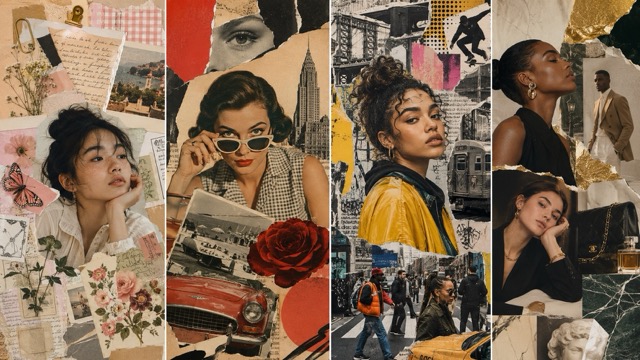
AI collage prompts are perfect for Pinterest-style images, scrapbook edits, moodboards, fashion posts, and creative profile visuals.
| Prompt Type | Best For | Copyable Prompt |
|---|---|---|
| Aesthetic Scrapbook Collage | Pinterest posts, moodboards, personal edits | Create a soft scrapbook collage using the uploaded portrait. Repeat the same person in multiple small photo cutouts, including front view, side profile, close-up face detail, and candid pose. Add torn paper, tape, handwritten-style decorations without readable text, flowers, soft shadows, warm beige tones, and a cozy Pinterest moodboard style. Keep the person recognizable and natural. |
| Vintage Magazine Collage | Fashion edits, editorial posts | Transform the uploaded photo into a vintage magazine collage. Use layered portrait cutouts, retro typography-style blocks without readable text, torn paper edges, muted colors, analog grain, soft shadows, and a fashion editorial layout. Keep the subject’s face and outfit consistent with the original image. |
| Urban Street Collage | Streetwear, creator content, bold visuals | Create an urban street-style collage with the uploaded person as the main subject. Add graffiti textures, ripped poster layers, bold color blocks, street photography frames, high contrast lighting, and a modern fashion magazine aesthetic. Make the image dynamic, stylish, and social-media-ready. |
| Luxury Editorial Collage | Premium profile images, fashion content | Turn the uploaded portrait into a luxury editorial collage. Add gold accents, dark background layers, glossy reflections, jewelry-inspired shapes, cinematic lighting, and premium fashion magazine composition. Keep the face realistic and avoid changing identity. |
3. Cinematic Portrait Prompts
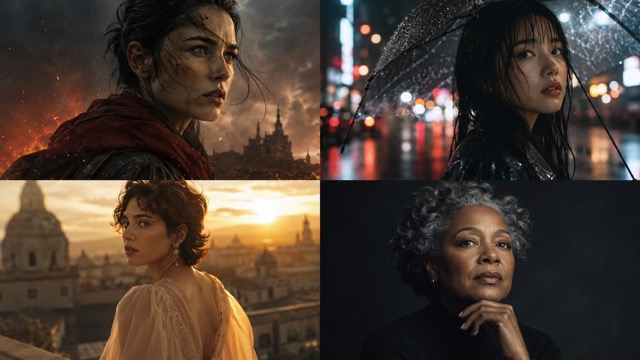
Cinematic portrait prompts are great for profile pictures, personal branding, creator content, thumbnails, and portfolio images.
| Prompt Type | Best For | Copyable Prompt |
|---|---|---|
| Movie Poster Portrait | Profile photos, dramatic portraits | Transform the uploaded portrait into a cinematic movie poster-style image. Add dramatic side lighting, deep shadows, soft background blur, realistic skin texture, intense expression, subtle film grain, and rich color grading. Keep the person’s face, hairstyle, and outfit consistent with the original photo. |
| Rainy Street Portrait | Moody edits, cinematic posts | Create a cinematic rainy street portrait from the uploaded photo. Place the subject in a moody night street scene with wet pavement reflections, soft neon lights, gentle rain, natural face details, and dramatic film lighting. Keep the pose and identity consistent. |
| Golden Hour Editorial | Lifestyle portraits, personal branding | Edit the uploaded portrait into a golden hour editorial photo. Add warm sunlight, soft rim lighting, natural skin glow, shallow depth of field, clean background blur, and a relaxed magazine-style mood. Preserve the original face, outfit, and expression. |
| Dark Studio Portrait | Professional headshots, avatar photos | Create a dark studio portrait with the uploaded person. Use a black or charcoal background, soft key light, subtle rim light, clean shadows, sharp facial details, natural skin texture, and premium editorial photography style. |
4. Color Analysis Prompts
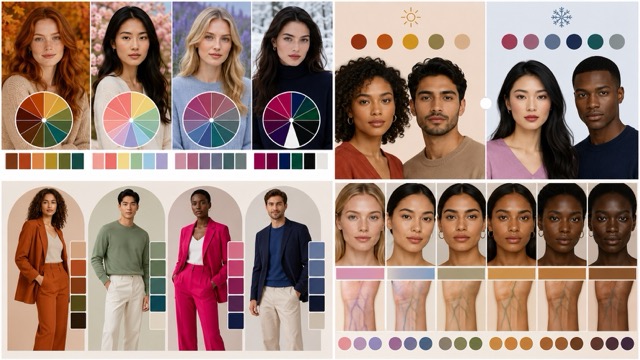
Color analysis prompts help users see what clothing colors, makeup tones, or visual palettes suit them best.
| Prompt Type | Best For | Copyable Prompt |
|---|---|---|
| Seasonal Color Analysis | Style guides, beauty content | Create a personal color analysis graphic using the uploaded portrait. Show four sections: Spring, Summer, Autumn, and Winter. Apply different clothing color palettes near the face, highlight the best match with a clean visual marker, and keep the design minimal, modern, and easy to understand. |
| Warm vs Cool Comparison | Outfit planning, makeup planning | Create a side-by-side warm vs cool color comparison using the uploaded portrait. On the left, apply warm outfit tones. On the right, apply cool outfit tones. Show how each palette affects the face, skin brightness, and overall harmony. Use a clean infographic layout with short labels only. |
| Best Outfit Colors | Fashion planning, wardrobe ideas | Analyze the uploaded portrait and create a visual guide showing five outfit colors that suit the person best. Keep the face natural, add color swatches beside the portrait, and use a clean fashion styling layout. |
| Skin Undertone Guide | Beauty content, makeup references | Create a skin undertone analysis graphic using the uploaded portrait. Show warm, cool, and neutral tone options with small color swatches near the face. Highlight the most natural-looking match. Keep the layout clean and visual-first. |
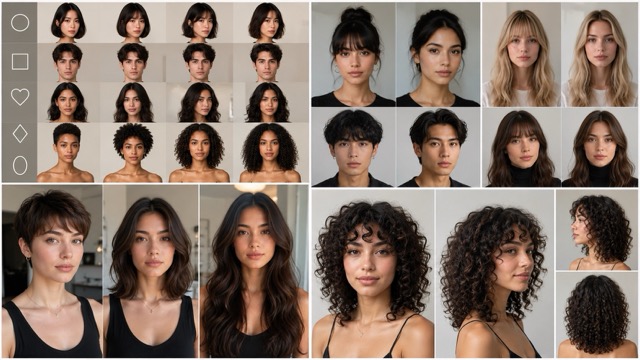
5. Hairstyle Analysis Prompts
Hairstyle prompts are useful for testing new looks before changing hair in real life.
| Prompt Type | Best For | Copyable Prompt |
|---|---|---|
| Face Shape Hairstyle Match | Haircut planning, salon references | Use the uploaded portrait to create a hairstyle recommendation graphic. Keep the person’s face unchanged and show four hairstyle options that match their face shape. Use realistic hair transformation, clean layout, short labels, and natural lighting. |
| Bangs vs No Bangs | Bangs preview, beauty content | Create a realistic hairstyle comparison using the uploaded portrait. Show bangs on one side and no bangs on the other side. Keep the face, skin tone, and outfit the same. Make the hair look natural, realistic, and suitable for social media. |
| Short vs Medium vs Long Hair | Hair length comparison | Create a three-panel hairstyle comparison using the uploaded portrait. Show short hair, medium-length hair, and long hair. Preserve the person’s identity and facial features. Use a clean beauty analysis layout. |
| Curly Hair Preview | Hair texture preview, style inspiration | Transform the uploaded portrait into a realistic curly hairstyle preview. Keep the face, skin tone, outfit, and background unchanged. Add natural curls with realistic volume, texture, shine, and hairline detail. |
6. Makeup Analysis Prompts
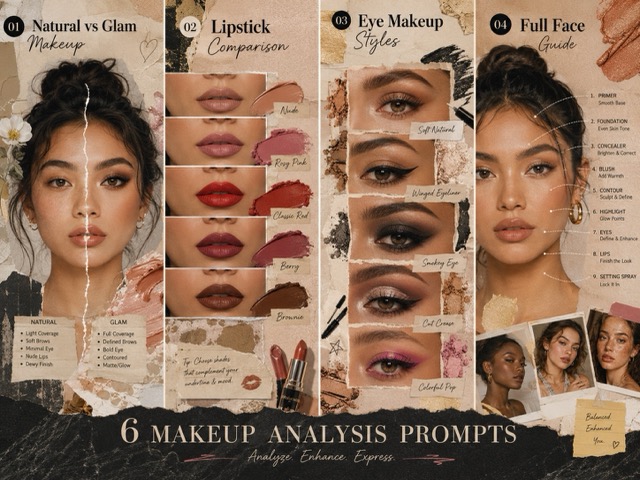
Makeup prompts are helpful for beauty creators, personal styling, makeup testing, and social posts.
| Prompt Type | Best For | Copyable Prompt |
|---|---|---|
| Natural vs Glam Makeup | Makeup comparison, beauty posts | Create a side-by-side makeup comparison using the uploaded portrait. On the left, show a soft natural makeup look. On the right, show a glam evening makeup look. Keep the same face, hairstyle, outfit, and lighting. Use realistic makeup application. |
| Lipstick Color Comparison | Beauty shopping, lipstick testing | Create a lipstick shade comparison using the uploaded portrait. Show six realistic lip colors in a clean grid layout. Keep the face natural and highlight the best matching shade with a subtle marker. |
| Eye Makeup Styles | Eye makeup guides, beauty tutorials | Create a visual eye makeup guide using the uploaded portrait. Compare soft eyeliner, smoky eye, winged liner, and bold editorial eye makeup. Keep the face realistic and use a clean beauty infographic layout. |
| Full Face Makeup Guide | Makeup planning, creator posts | Transform the uploaded portrait into a makeup guide with three looks: daily, party, and editorial. Keep the person recognizable and show realistic foundation, blush, eye makeup, and lip color for each look. |
7. Couple and Friendship Photo Prompts
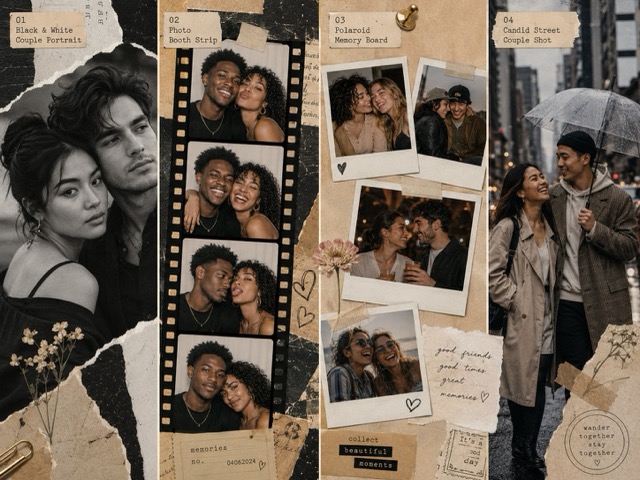
These ChatGPT trending prompts work well for couples, best friends, family photos, and social media memories.
| Prompt Type | Best For | Copyable Prompt |
|---|---|---|
| Black and White Couple Portrait | Romantic portraits, timeless edits | Transform the uploaded couple photo into a cinematic black and white portrait. Keep both people’s faces, expressions, and pose natural. Add soft film grain, gentle contrast, romantic lighting, and timeless editorial style. |
| Photo Booth Strip | Couple photos, friend group memories | Turn the uploaded couple or friends photo into a vintage photo booth strip. Create four small frames with slightly different expressions, direct flash lighting, glossy paper texture, subtle grain, and nostalgic party-photo style. |
| Polaroid Memory Board | Scrapbook edits, friendship posts | Create a Polaroid-style memory board using the uploaded people. Add several printed photo frames, handwritten-style decorations without readable text, tape, warm lighting, and a cozy scrapbook mood. |
| Candid Street Couple Shot | Lifestyle couple photos, romantic posts | Transform the uploaded couple photo into a candid street photography scene. Add warm city lights, soft motion blur, natural smiles, realistic clothing details, and an intimate documentary-style mood. |
8. AI Avatar and Profile Picture Prompts
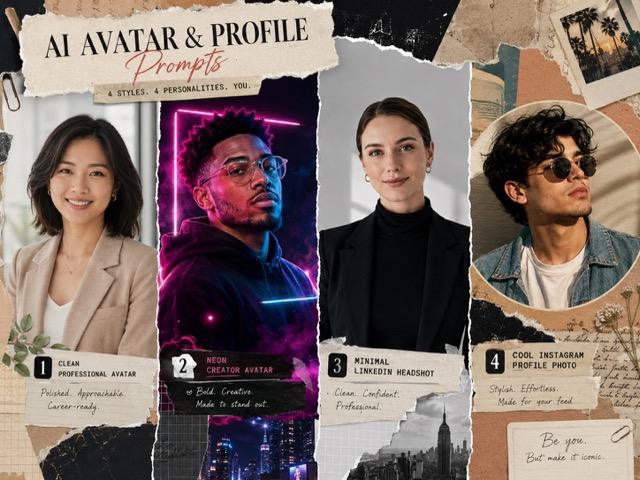
Avatar prompts are useful for profile photos, creator branding, gaming profiles, and social media accounts.
| Prompt Type | Best For | Copyable Prompt |
|---|---|---|
| Clean Professional Avatar | LinkedIn, business profiles, creator bio | Create a clean professional avatar from the uploaded portrait. Keep the face, hairstyle, and expression realistic. Use a simple studio background, soft lighting, sharp facial details, and a polished profile photo style. |
| Neon Creator Avatar | Gaming profiles, creator branding | Transform the uploaded portrait into a neon creator avatar. Add soft neon rim light, dark background, modern tech-inspired atmosphere, realistic face, and sharp details. Keep the result suitable for profile pictures and social media branding. |
| Minimal LinkedIn Headshot | Professional profile photos | Create a natural professional headshot using the uploaded photo. Use clean background blur, soft studio lighting, realistic skin texture, confident expression, and business-friendly composition. Keep the person’s identity unchanged. |
| Cool Instagram Profile Photo | Instagram avatars, social profiles | Edit the uploaded portrait into a stylish Instagram profile picture. Add soft flash lighting, clean background, sharp face details, natural expression, and modern social media photo style. |
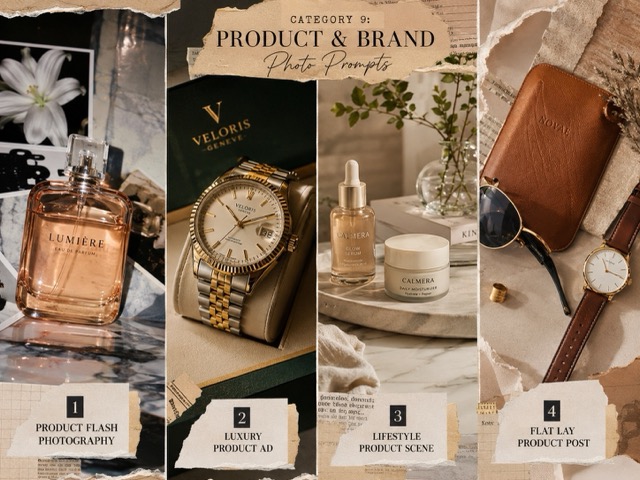
9. Product and Brand Photo Prompts
These prompts are useful for creators, small shops, e-commerce sellers, and social media product posts.
| Prompt Type | Best For | Copyable Prompt |
|---|---|---|
| Product Flash Photography | Instagram product posts, direct-flash style | Create a direct-flash product photo using the uploaded product image. Keep the product shape, logo, material, and color accurate. Add bright flash highlights, crisp shadows, clean background, and modern Instagram product photography style. |
| Luxury Product Ad | Premium ads, e-commerce banners | Transform the uploaded product photo into a luxury advertising image. Use dark background, glossy reflections, premium lighting, clean shadows, and elegant composition. Keep the product details accurate and sharp. |
| Lifestyle Product Scene | Brand posts, product storytelling | Place the uploaded product into a realistic lifestyle scene. Match the product style with a clean table, soft daylight, natural shadows, and social-media-ready composition. Keep the product unchanged. |
| Flat Lay Product Post | Online shop posts, brand visuals | Create a flat lay product image using the uploaded item. Add complementary props, soft shadows, clean spacing, natural lighting, and a polished Instagram brand post style. |
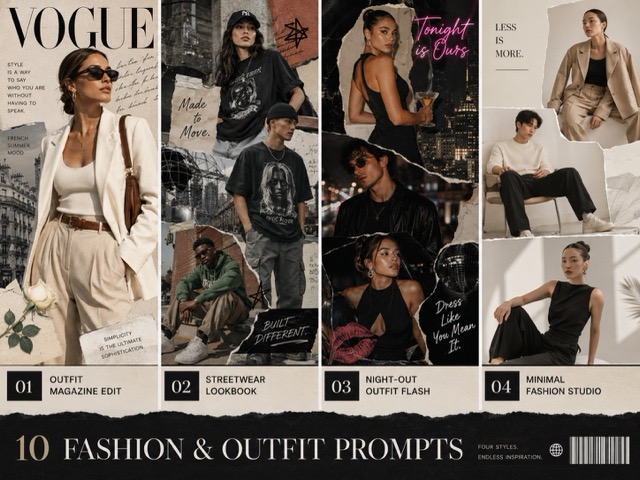
10. Fashion and Outfit Prompts
Fashion prompts are great for outfit inspiration, virtual styling, social posts, and creator content.
| Prompt Type | Best For | Copyable Prompt |
|---|---|---|
| Outfit Magazine Edit | Fashion posts, editorial images | Transform the uploaded outfit photo into a high-fashion magazine shot. Keep the outfit design, colors, and fit unchanged. Add editorial lighting, clean background, confident pose, and premium fashion photography style. |
| Streetwear Lookbook | Streetwear creators, outfit content | Create a streetwear lookbook image from the uploaded outfit photo. Add urban background, natural walking pose, soft motion, high contrast, and modern street fashion styling. |
| Night-Out Outfit Flash | Party outfits, social media stories | Turn the uploaded outfit photo into a night-out Instagram flash shot. Add direct flash lighting, glossy fabric highlights, dark background shadows, sharp outfit details, and candid social media energy. |
| Minimal Fashion Studio | Clean outfit photos, online styling | Create a minimal studio fashion portrait using the uploaded outfit. Use a clean gray background, soft shadows, realistic clothing texture, and editorial fashion composition. |
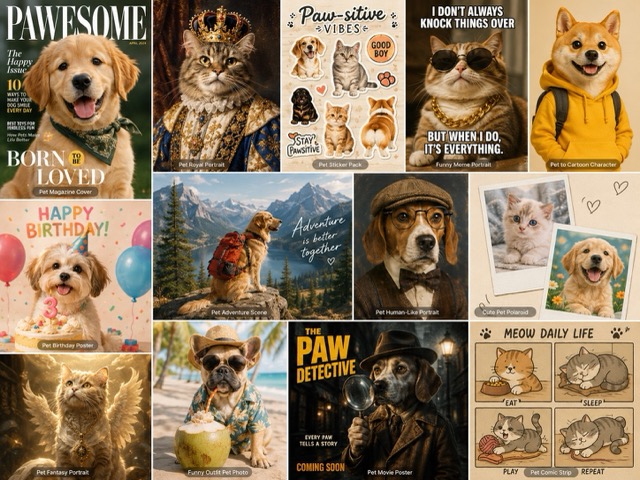
11. Pet and Fun Creative Prompts
Pet and fun creative prompts are great for casual social media posts, funny profile images, sticker-style visuals, pet portraits, and shareable content.
| Prompt Type | Best For | Copyable Prompt |
|---|---|---|
| Pet Magazine Cover | Pet portraits, social media posts, pet blog images | Turn the uploaded pet photo into a stylish magazine cover-style portrait without adding readable text. Keep the pet’s face, fur pattern, eye color, and expression recognizable. Add clean studio lighting, sharp fur detail, a colorful editorial background, soft shadows, and a polished pet photography style. Make the image cute, realistic, and ready for social media sharing. |
| Pet Royal Portrait | Funny pet posts, profile images, creative edits | Transform the uploaded pet photo into a royal portrait. Keep the pet’s face, fur texture, eyes, and unique markings consistent with the original photo. Add elegant royal clothing, classic portrait lighting, a rich vintage background, and a humorous but realistic style. Make the result look like a high-quality painted royal pet portrait while keeping the pet recognizable. |
| Pet Sticker Pack | Stickers, memes, chat images, social sharing | Create a cute sticker pack using the uploaded pet photo. Show the same pet in multiple fun expressions and small poses, such as happy, surprised, sleepy, playful, and excited. Keep the pet’s face and fur pattern consistent. Use a clean background, soft outlines, bright colors, and a social media sticker style. Make each sticker look clear, cute, and easy to share. |
| Funny Meme Portrait | Meme images, funny posts, casual content | Create a funny meme-style portrait from the uploaded photo. Keep the subject recognizable and natural, but slightly exaggerate the expression for humor. Use bold composition, strong contrast, clean lighting, and a shareable social media style. Do not add offensive elements or readable text. Make the result playful, funny, and suitable for casual posting. |
| Pet to Cartoon Character | Cute pet avatars, profile pictures, sticker ideas | Turn the uploaded pet photo into a charming cartoon character while keeping the pet’s main features recognizable. Preserve the fur color, eye shape, markings, and expression. Add a clean illustrated style, soft shadows, smooth outlines, and a friendly character design. Make the result cute, polished, and suitable for avatars or stickers. |
| Pet Birthday Poster | Birthday posts, pet party images, social media cards | Create a fun birthday poster-style image using the uploaded pet photo. Keep the pet realistic and recognizable. Add birthday decorations, soft balloons, warm lighting, a festive background, and a cheerful mood. Do not add readable text. Make the image bright, cute, and ready for Instagram or story sharing. |
| Pet Adventure Scene | Creative pet edits, fantasy posts, fun content | Transform the uploaded pet photo into a fun adventure scene. Keep the pet’s face, fur, and markings accurate. Place the pet in a playful outdoor setting, such as a forest trail, sunny park, or small fantasy adventure scene. Add natural lighting, soft depth of field, clean details, and a cute cinematic mood. Make the result imaginative but still realistic. |
| Pet Human-Like Portrait | Funny creative edits, viral posts, pet character ideas | Create a humorous human-like portrait of the uploaded pet. Keep the pet’s face, eyes, fur color, and expression recognizable. Add a stylish outfit, natural portrait lighting, and a clean studio background. Make the image funny and creative, but avoid making it creepy or overly distorted. The final result should feel charming, shareable, and social-media-ready. |
| Cute Pet Polaroid | Scrapbook images, lifestyle posts, memory-style edits | Turn the uploaded pet photo into a cute Polaroid-style image. Keep the pet natural and recognizable. Add soft flash lighting, warm tones, subtle film grain, a white photo border, and a cozy lifestyle mood. Make the image look like a real printed memory photo without adding readable text. |
| Pet Fantasy Portrait | Creative visuals, fun profile images, fantasy-style posts | Transform the uploaded pet into a magical fantasy portrait. Preserve the pet’s face, fur texture, markings, and expression. Add soft glowing light, dreamy background details, gentle sparkles, and cinematic fantasy atmosphere. Keep the pet realistic enough to recognize, and make the final image cute, polished, and creative. |
| Funny Outfit Pet Photo | Pet fashion posts, humorous social content | Edit the uploaded pet into a funny outfit photo. Keep the pet’s face, body shape, fur pattern, and expression natural. Add a cute outfit that matches the pet’s size and pose, such as a tiny hoodie, bow tie, sunglasses, or cozy sweater. Use realistic lighting and fabric texture. Make the result funny, adorable, and ready to post. |
| Pet Movie Poster | Dramatic pet edits, thumbnails, creative posts | Create a cinematic movie poster-style image using the uploaded pet photo. Keep the pet recognizable and centered as the main character. Add dramatic lighting, atmospheric background, strong shadows, sharp fur details, and a heroic or mysterious mood. Do not add readable text. Make the image look like a polished pet movie poster concept. |
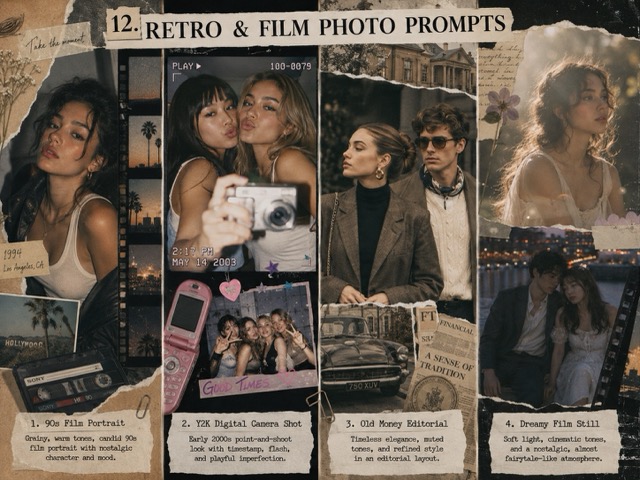
12. Retro and Film Photo Prompts
Retro prompts are widely used for nostalgic images, vintage posts, Y2K edits, and film-style portraits.
| Prompt Type | Best For | Copyable Prompt |
|---|---|---|
| 90s Film Portrait | Nostalgic portraits, lifestyle posts | Transform the uploaded portrait into a 90s film photo. Add soft grain, warm tones, slight blur, natural skin texture, faded shadows, and a nostalgic camera look. Keep the face, outfit, and pose natural. |
| Y2K Digital Camera Shot | Party photos, flash edits, retro posts | Create a Y2K digital camera photo from the uploaded image. Add direct flash, slight overexposure, low-resolution camera texture, glossy skin highlights, and early-2000s party photo mood. Preserve the subject’s identity and outfit. |
| Old Money Editorial | Elegant portraits, luxury lifestyle edits | Turn the uploaded portrait into an old money editorial photo. Use soft natural light, classic clothing style, muted colors, elegant background, and refined magazine photography mood. Keep the person realistic and recognizable. |
| Dreamy Film Still | Soft portraits, emotional visuals | Create a dreamy film still from the uploaded portrait. Add soft focus, pastel tones, shallow depth of field, cinematic lighting, and a calm emotional atmosphere. Preserve the person’s face, expression, and natural details. |
13. Advanced Creative Prompts
Advanced creative prompts are useful when you want artistic, eye-catching, or concept-based AI images.
| Prompt Type | Best For | Copyable Prompt |
|---|---|---|
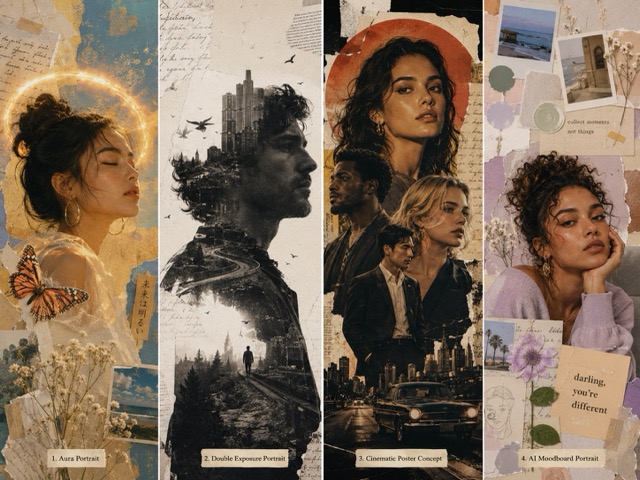
| Aura Portrait | Spiritual edits, dreamy profile images | Create an aura-style portrait from the uploaded photo. Keep the face realistic and add soft colorful energy around the subject, gentle glow, dreamy background, and spiritual editorial mood. Avoid making it too cartoonish. |
| Double Exposure Portrait | Artistic portraits, creative visuals | Transform the uploaded portrait into a double exposure artwork. Blend the face with city lights, flowers, clouds, or nature textures. Keep the facial features recognizable and use a clean artistic composition. |
| Cinematic Poster Concept | Movie-style images, thumbnails, dramatic edits | Create a cinematic poster-style image using the uploaded portrait. Add dramatic lighting, strong shadows, atmospheric background, intense expression, and high-end movie poster composition without readable text. |
| AI Moodboard Portrait | Pinterest boards, creator visuals, personal branding | Create a visual moodboard around the uploaded person. Include multiple small photo fragments, color swatches, lifestyle details, soft paper texture, clean layout, and a stylish Pinterest-inspired aesthetic. |
Want More GPT Image Prompt Ideas?
The prompt examples above cover popular ChatGPT trending prompts such as flash photos, AI collages, cinematic portraits, color analysis, hairstyle previews, makeup analysis, couple photos, avatars, product images, fashion edits, pet photos, retro film looks, and advanced creative effects.
If you want more examples beyond this list, visit the full GPT Image Prompt Guide. It includes more prompt ideas for AI image generation, photo editing, creative portraits, social media visuals, and practical image workflows.
You can use that guide when you need:
| Need | What to Look For |
|---|---|
| More AI photo ideas | Browse extra prompt styles and image examples |
| Better prompt wording | Learn how to describe lighting, subject, style, and details |
| Social media visuals | Find prompts for Instagram, TikTok, Pinterest, and profile photos |
| Image editing prompts | Get ideas for improving uploaded photos with AI |
| Creative references | Explore more visual directions before generating images |
Best Prompt Types by Use Case
| Use Case | Best Prompt Categories |
|---|---|
| Instagram posts | Flash effect, collage, fashion, retro |
| Profile pictures | Avatar, cinematic portrait, studio headshot |
| TikTok covers | Flash photo, Y2K, cinematic poster |
| Pinterest content | Scrapbook collage, moodboard, color analysis |
| Beauty content | Makeup analysis, hairstyle analysis |
| Fashion content | Outfit edit, streetwear, magazine style |
| Brand content | Product photography, lifestyle product scenes |
| Personal photos | Couple photos, film look, golden hour portraits |
| Pet content | Pet sticker pack, pet magazine cover, pet movie poster |
| Creative concepts | Aura portrait, double exposure, moodboard portrait |
FAQ
What are ChatGPT trending prompts?
ChatGPT trending prompts are text instructions that help AI tools create popular image styles, such as flash photos, collages, cinematic portraits, hairstyle previews, makeup comparisons, product photos, pet edits, and social media visuals.
Can I use these prompts with my own photo?
Yes. Upload your photo to an AI image tool, paste a prompt, and generate a new edited result. For best results, use a clear photo with good face, outfit, product, or pet details.
Are ChatGPT trending prompts free to use?
The prompts themselves are free to copy and edit. Some AI image tools may offer free credits or paid plans depending on the platform.
What kind of photos work best?
Selfies, portraits, outfit photos, couple images, product photos, pet photos, and lifestyle images usually work well. Clear photos with visible details give better results.
Can these prompts create Instagram-style images?
Yes. Many ChatGPT trending prompts are designed for Instagram posts, stories, profile pictures, TikTok covers, Pinterest visuals, and other social media content.
How do I make AI photo edits look more realistic?
Use words like realistic skin texture, natural face, preserve identity, correct lighting, clean shadows, and high-resolution details. Avoid asking for too many effects at once.
Final Thoughts
ChatGPT trending prompts make AI photo editing easier, faster, and more creative. Whether you want an Instagram flash effect, a scrapbook collage, a cinematic portrait, a hairstyle preview, a makeup guide, a product image, a pet portrait, or a retro film look, the right prompt can help you get a cleaner and more useful result.
For more ready-to-use examples, creative styles, and image prompt ideas, continue reading the full GPT Image Prompt Guide. It can help you find more prompts after trying the ChatGPT trending prompts in this article.