How to Use an AI Face Rater Free Tool and Get Your Facial Aesthetic Report
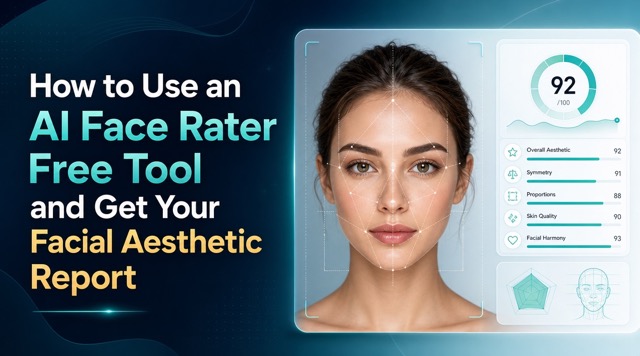
Upload your photo, let AI do the work, and walk away with a full facial aesthetic report — completely free.
Have you ever looked in the mirror and wondered how your facial features stack up by aesthetic standards?
Maybe you're curious about facial symmetry, bone structure, or simply want an outside perspective — one that's objective, instant, and free.
That's exactly what an AI face rater free tool is built for.
In this tutorial, we'll walk you through how to use the AI face rater free feature on BananaPro AI, what kind of results to expect, and how to make the most of your facial aesthetic report.
Whether you're testing it out of curiosity or preparing for a more serious self-improvement goal, this guide has you covered.
What Is an AI Face Rater Free Tool?
An AI face rater free tool is an effect that uses artificial intelligence to evaluate your facial features based on widely recognized aesthetic principles — things like golden ratio proportions, facial symmetry, feature balance, and skin clarity.
Unlike subjective opinions from friends or strangers online, an AI face rater free delivers consistent, data-driven analysis.
There's no bias, no mood, and no social filter.
The AI processes your uploaded photo and returns a structured facial aesthetic report that breaks down your facial strengths and areas for improvement.
The BananaPro AI face rater free tool does exactly this — and it does it without requiring you to create an account or pay a subscription fee.
Step-by-Step: How to Use the BananaPro AI Face Rater Free Tool
Here's a simple walkthrough to get your facial aesthetic report in just a few minutes.
Step 1: Navigate to the Tool
CLICK AI face rater👈. You'll land directly on the AI face rater free page.
Step 2: Upload Your Photo
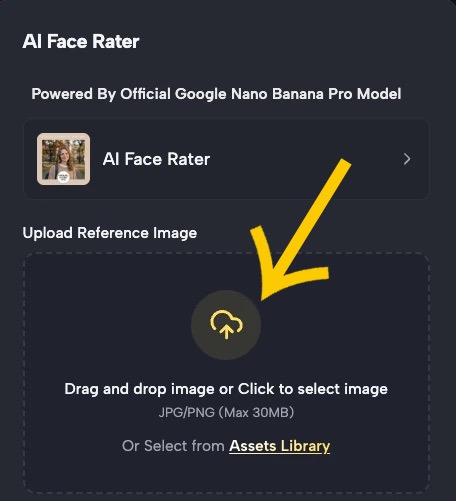
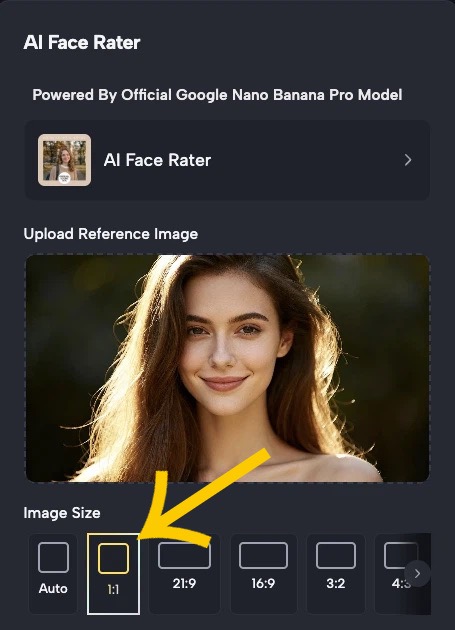
Click the upload button and select a clear, front-facing photo.
Step 3: Let the AI Process Your Image
Once you upload your photo, the AI face rater free gets ready to work. Choose the image size you needed then click Generate Image.
The analysis usually takes just a few seconds — everything from the width-to-height ratio of your face to the spacing between your eyes, nose, and lips.
Step 4: Review Your Facial Aesthetic Report
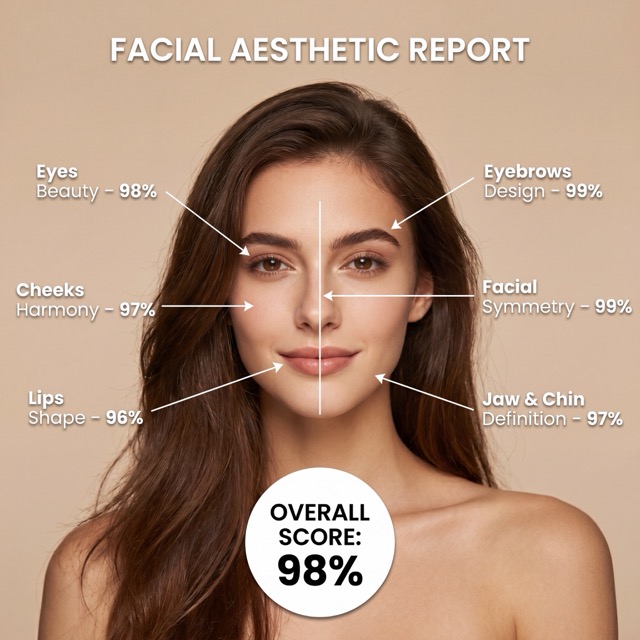
Your facial aesthetic report will appear on screen with a breakdown of key metrics.
The facial aesthetic report is designed to be easy to read — you don't need a background in aesthetics or facial anatomy to understand it.
Step 5: Save or Share Your Results
Once you've reviewed your facial aesthetic report, you can screenshot or save the results.
Some users like to compare reports over time, especially after making changes to grooming, skincare, or fitness habits.
Tips for Getting the Most Out of the AI Face Rater Free
For the best facial aesthetic report, consider these practical tips:
-
Choose the right photo. The quality of your input directly affects the accuracy of your facial aesthetic report. Use a photo with good, even lighting — avoid harsh shadows or blown-out backgrounds. Make sure your full face is visible, with no sunglasses, heavy filters, or extreme angles.
-
Try multiple photos. Run the AI face rater free on a few different shots — different lighting, different angles slightly off-center — to see how your score varies. This tells you a lot about which photos present you in the best light.
-
Compare before and after. If you're working on a skincare routine, hitting the gym, or experimenting with grooming, use the AI face rater free periodically to get updated reports. Progress is more visible when it's measured.
-
Don't over-index on the score. The facial aesthetic report is a useful reference point, not a verdict on your worth or attractiveness. Use it as a tool for self-awareness, not self-judgment.
-
Share it for fun. The AI face rater free is a surprisingly popular conversation starter. Compare scores with friends, family, or even your past and present photos.
Why Use an AI Face Rater?
People use an AI face rater free for many different reasons:
- Personal curiosity — Just want to know what AI thinks of your look? Fair enough.
- Photo selection — Choosing the best photo for a dating profile, LinkedIn, or portfolio can be tricky. An AI face rater free gives you an objective score to compare shots.
- Fitness and glow-up tracking — Some users run the AI face rater free tool periodically to track how lifestyle changes affect their appearance over time.
- Confidence building — A detailed facial aesthetic report often highlights features people overlook in themselves.
- Aesthetic education — Learning what "facial harmony" actually means, backed by data, can be surprisingly insightful.
Whatever your reason, having access to an AI face rater free makes professional-level aesthetic analysis available to anyone.
Final Thoughts
The BananaPro AI face rater free tool makes professional-grade facial aesthetic report accessible to everyone.
Whether you're driven by curiosity, self-improvement, or photo selection, the AI face rater free delivers real insights without the guesswork.
Head over to BananaPro AI face rater, upload your photo, and see what your facial aesthetic report has to say.