

More AI Image Generators
Explore our collection of specialized AI image generators designed for different creative needs and styles






















Create Vibrant 3D Pixar Art with AI 3D Pixar Generator
Let AI 3D Pixar Generator turn the scene into colorful 3D animated artwork.
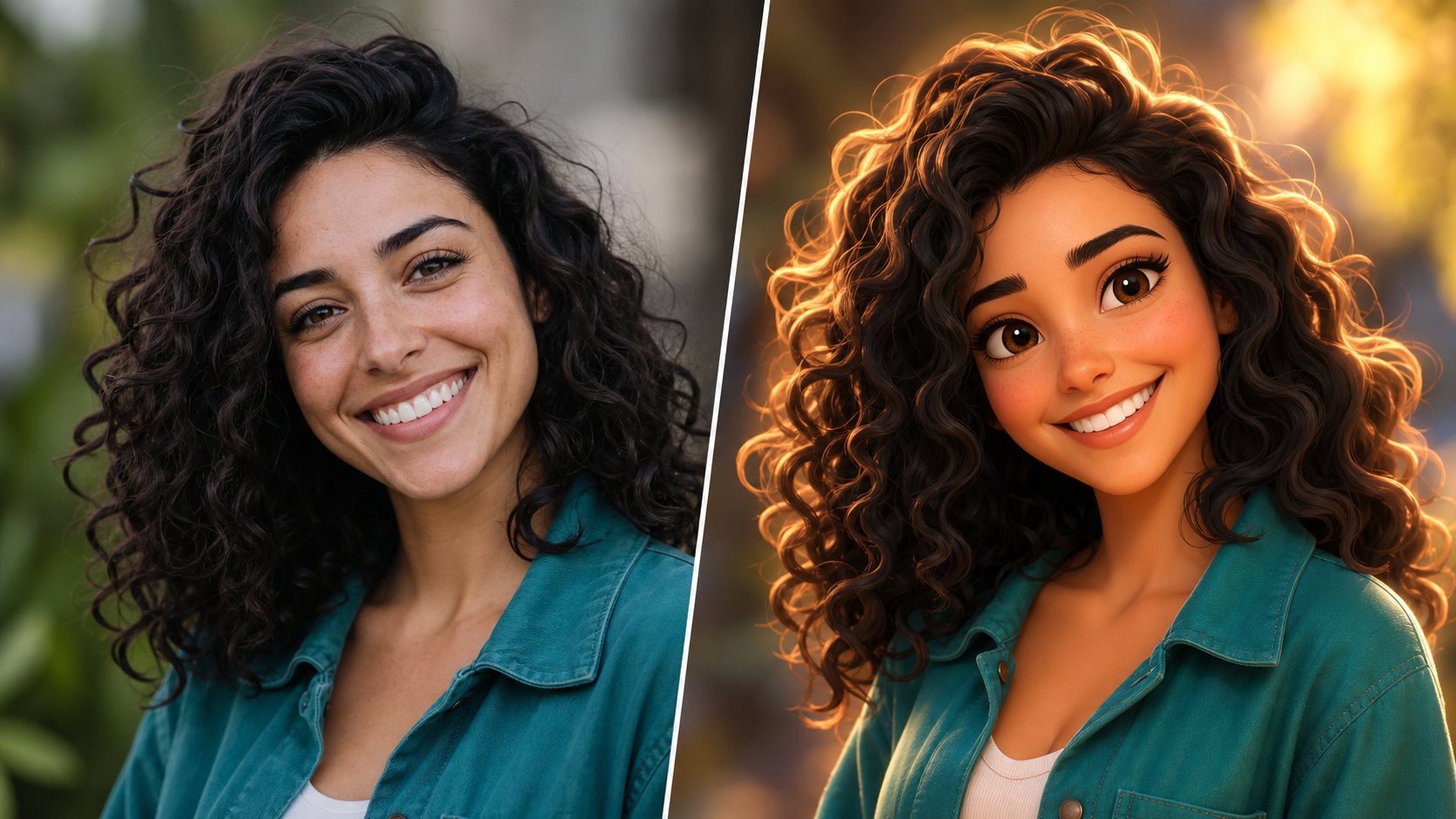
AI 3D Pixar Generator gives portraits, pet photos, and everyday snapshots a polished animated makeover. Use AI 3D Pixar Generator to keep the subject recognizable while adding rounded shapes, vivid color, dimensional lighting, and a cinematic 3D cartoon finish.
How to Use AI 3D Pixar Generator
AI 3D Pixar Generator keeps the creative process straightforward: upload an image, choose the image size, and generate a vibrant 3D cartoon interpretation that respects the original subject for sharing.

Upload a Clear Photo
Start AI 3D Pixar Generator with a photo that clearly shows the people, pet, or scene you want to restyle. A well-framed image helps AI 3D Pixar Generator preserve the important composition, facial cues, clothing, and background context while preparing the animated transformation. Use a source with a visible focal point so the restyled scene remains visually clear and easy to read.

Choose Your Image Size
Select an image size that matches your goal before you generate. AI 3D Pixar Generator can support a square layout for profile images, a portrait layout for character art, or a landscape layout for wider scenes. The AI 3D Pixar Style Generator workflow stays simple and focused. Consider where the final artwork will appear before you commit to a ratio.

Generate and Review Your Result
Run AI 3D Pixar Generator and review the new 3D cartoon version of your image. Look for recognizable features, balanced framing, lively color, and a visual mood that fits your original photo. Use AI 3D Pixar Generator again with another image size when you want a different composition. Small framing changes can make the subject feel more character-focused or more cinematic.
Best AI Image Tools for Creative Projects
Explore creative tools for image, learn tips and tricks, and see how AI can be your assistant in turning concepts into finished projects.



Creative Ways to Use AI 3D Pixar Generator
From individual portraits to wider storytelling scenes, AI 3D Pixar Generator helps you explore playful 3D cartoon treatments while choosing an image size that suits each creative idea with confidence.
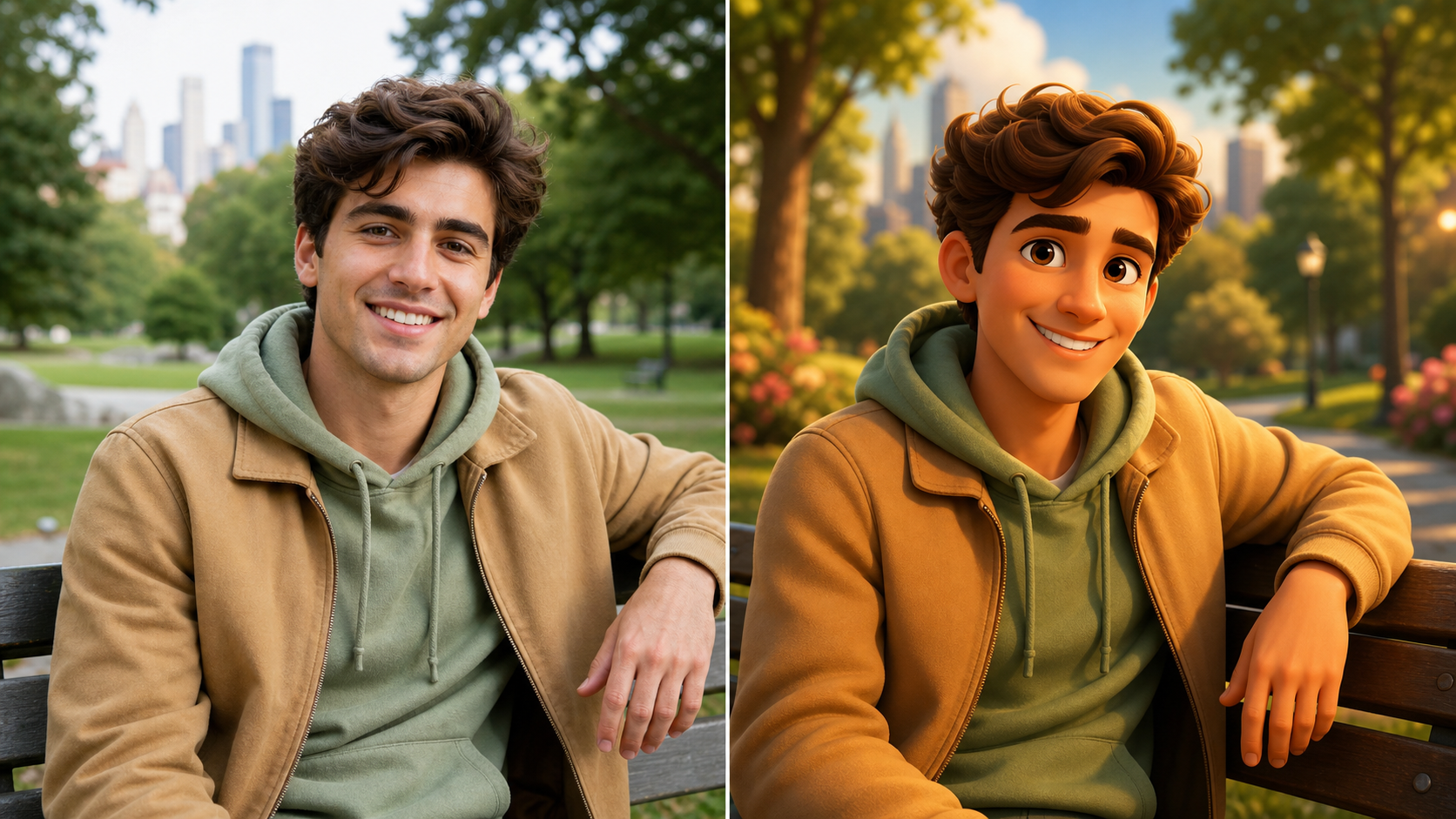
Turn Portraits into Expressive 3D Characters
- AI 3D Pixar Generator can reinterpret a selfie or portrait as a warm, expressive 3D cartoon character.
- Rounded forms, bright color, and soft cinematic light add dimension without losing the subject's key visual traits.
- Use AI 3D Pixar Generator for profile art, creative portraits, or a playful character reveal.
- The AI Pixar Style Generator approach works best when the original face is clear and naturally framed.
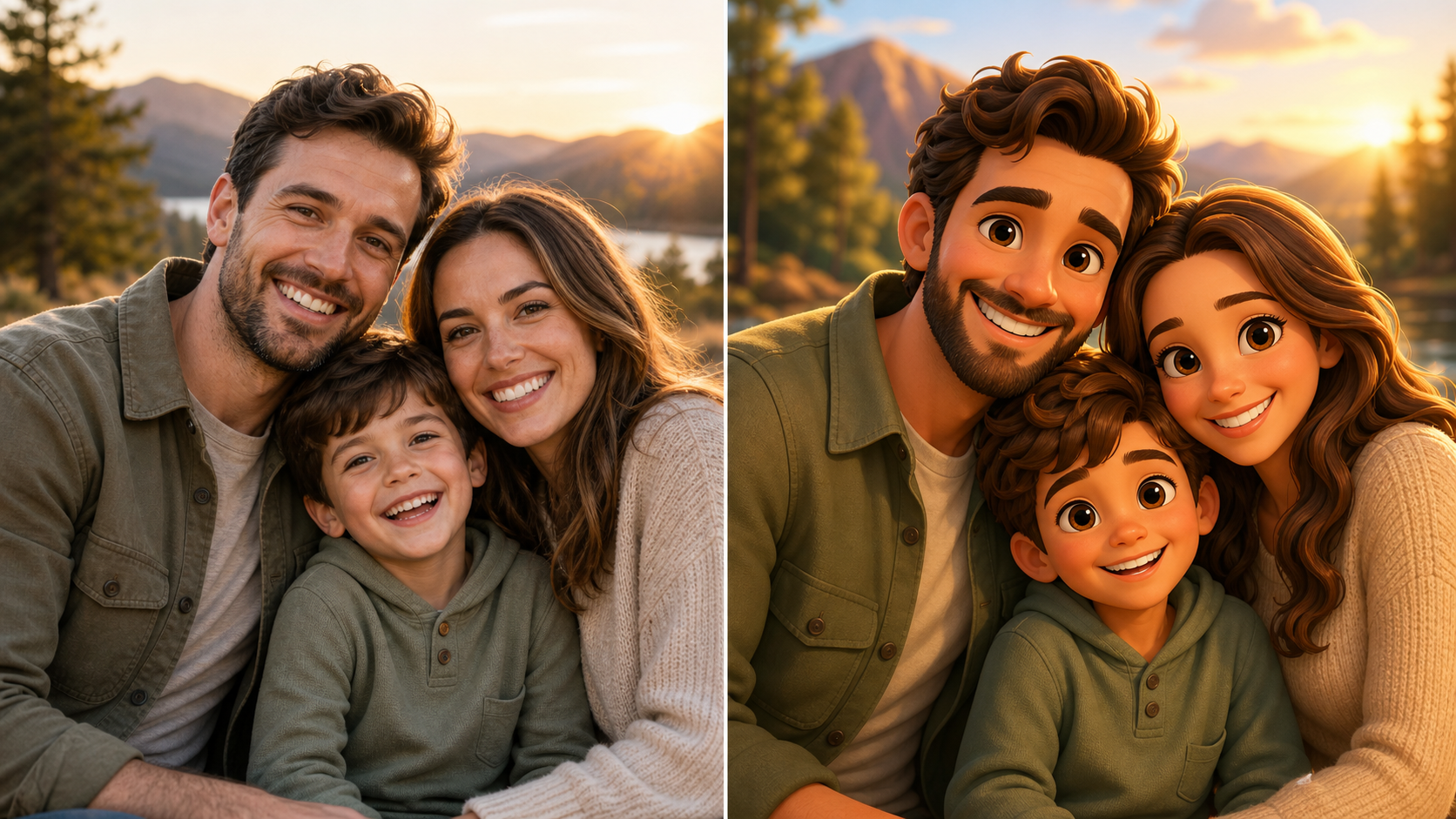
Reimagine Family Photos as Animated Moments
- Give a family photo a storybook-like 3D treatment with AI 3D Pixar Generator.
- AI 3D Pixar Generator preserves the group arrangement while reshaping the scene with expressive faces, rich color, and dimensional lighting.
- Choose a wider image size for group compositions and environmental details.
- The AI 3D Pixar Style Generator makes familiar celebrations and everyday snapshots feel like memorable animated scenes.
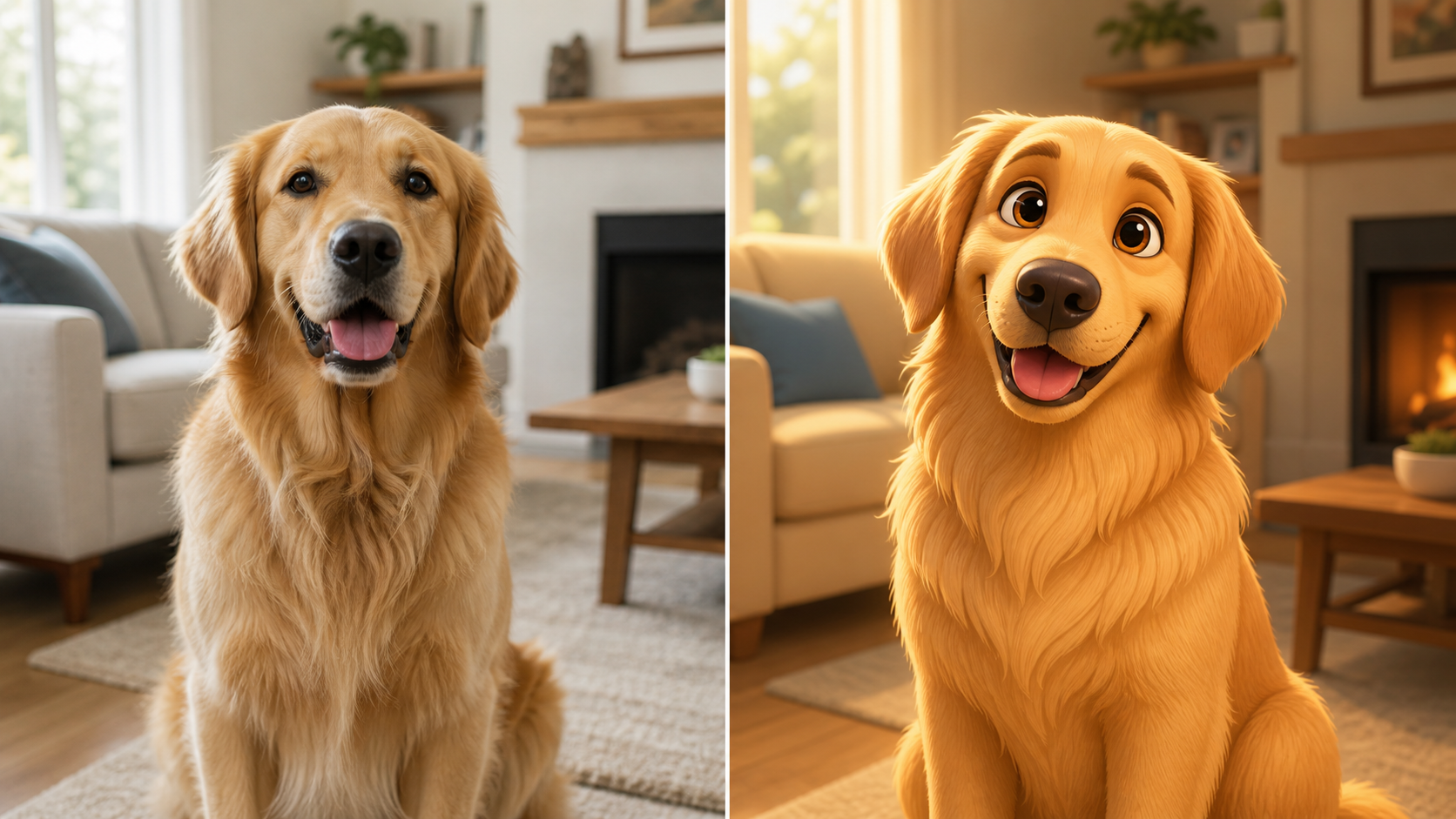
Create Charming Cartoon Pet Portraits
- Use AI 3D Pixar Generator to turn a pet photo into a character-focused 3D cartoon portrait.
- AI 3D Pixar Generator can emphasize the animal's pose, expression, fur pattern, and favorite setting while adding a polished animated finish.
- A square image size is useful for profile pictures and keeps the pet centered.
- The AI Pixar Style Generator result feels playful without flattening the original personality.
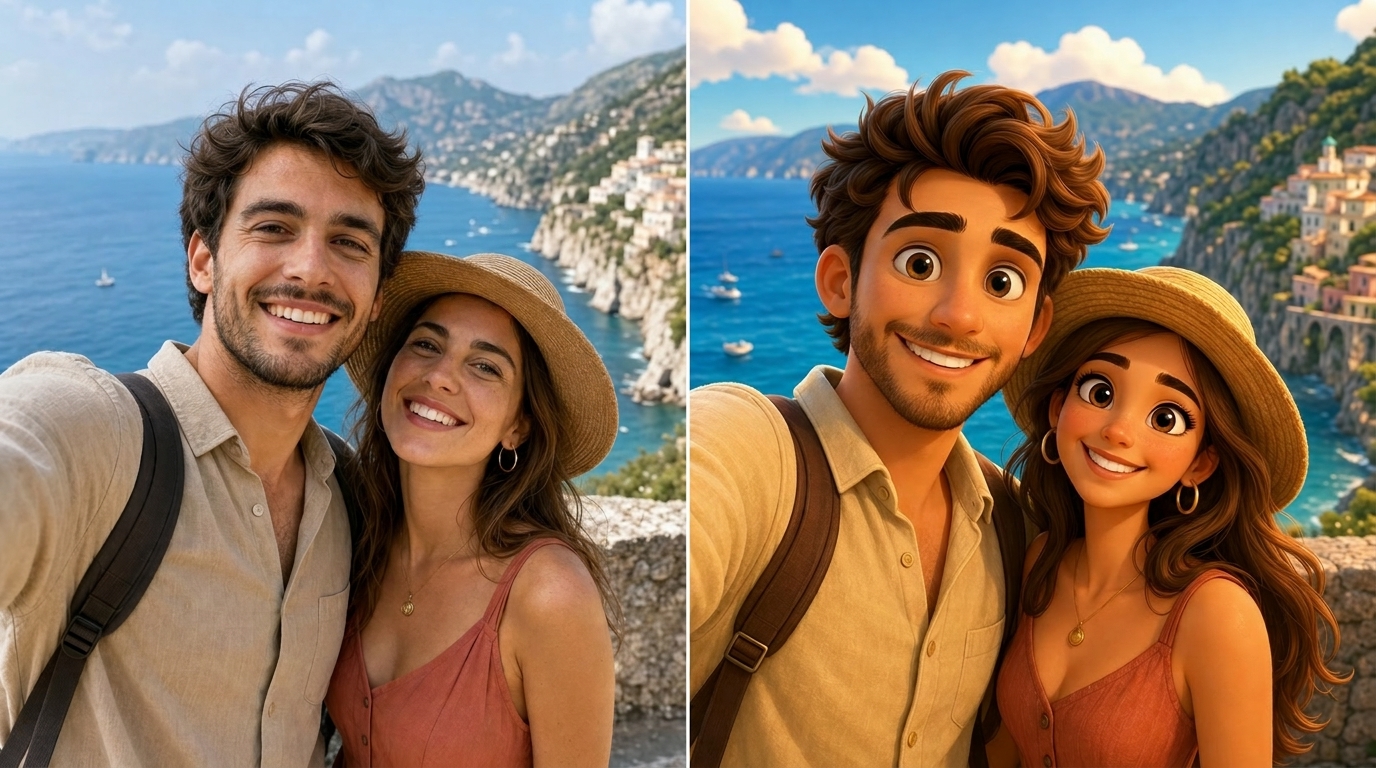
Build Colorful Scenes for Social Sharing
- AI 3D Pixar Generator turns ordinary travel, lifestyle, and celebration photos into attention-grabbing 3D cartoon scenes.
- Pick an image size that fits the intended post, then let AI 3D Pixar Generator add vibrant color and a cinematic animated mood.
- The AI 3D Pixar Style Generator is useful when you want a fresh visual for a profile, feed post, invitation, or personal creative project.
Why Choose AI 3D Pixar Generator
AI 3D Pixar Generator combines a focused photo upload workflow with image-size selection and a vibrant 3D cartoon result, making creative experimentation approachable for many kinds of personal images in practice.

Preserve Recognizable Subject Details
AI 3D Pixar Generator is designed for image-to-image restyling, so the source photo remains the creative anchor. AI 3D Pixar Generator should retain important cues such as face shape, hairstyle, outfit, pose, and scene layout while translating the image into a rounded, colorful 3D cartoon interpretation. This balance keeps the result imaginative without disconnecting it from the uploaded moment.

Match the Composition to Your Image Size
Choose the image size before you create. AI 3D Pixar Generator can frame a close-up portrait differently from a wide family photo or scenic travel image. With AI 3D Pixar Generator, a deliberate aspect-ratio choice helps the final cartoon artwork feel composed for its intended use. Match the ratio to the focal point and the placement you have in mind.

Add a Vibrant 3D Cartoon Finish
AI 3D Pixar Generator focuses on a lively animated look: saturated but balanced colors, smooth dimensional forms, expressive character cues, and warm cinematic light. The AI Pixar Style Generator direction is especially suitable for photos that benefit from a cheerful, polished, story-driven visual mood. It gives everyday images a more crafted appearance while keeping them approachable across different creative uses.

Explore Portrait, Pet, and Group Photos
Try AI 3D Pixar Generator with different source images to discover which compositions work best. Portraits can become character art, pet photos can become playful profile images, and group pictures can become animated scenes. AI 3D Pixar Generator adapts the treatment to the subject you upload. Clear separation between subjects can help a group scene stay readable throughout the restyled composition.

Create Personal Visuals for Sharing
Use AI 3D Pixar Generator when a standard photo feels too ordinary for a personal post, profile refresh, greeting, or creative keepsake. AI 3D Pixar Generator adds a distinctive illustrated feel while keeping the source moment visible, recognizable, and easy to connect with. The final image can support a more personal visual story than a generic stock graphic for sharing.

Iterate with Different Crops and Ratios
A single photo can support several visual directions. Run AI 3D Pixar Generator with a square crop for a character portrait, then try a landscape image size for more environment. The AI 3D Pixar Style Generator workflow makes it easy to compare compositions before choosing your favorite. This is useful when the same artwork may appear in several placements later.
What Creators Say About AI 3D Pixar Generator
Creators use AI 3D Pixar Generator to explore colorful character portraits, group scenes, and pet art. Their experiences highlight recognizable subjects, thoughtful image-size choices, and an approachable transformation flow in practice.
I used AI 3D Pixar Generator on a simple portrait and liked how the result still looked like me while feeling much more playful. AI 3D Pixar Generator gave the lighting and color a polished animated quality that worked well for a new profile image.
Our family photo had several people and a lot of background detail, so I chose a landscape image size. AI 3D Pixar Generator kept the group readable and turned the picture into a warm cartoon scene. The AI Pixar Generator result made a fun digital keepsake.
My dog's portrait became a bright 3D character without losing his expression or markings. AI 3D Pixar Generator handled the centered crop nicely, and the square image size was practical for sharing. I would use AI 3D Pixar Generator again for another pet photo.
I wanted a more imaginative version of a vacation snapshot. AI 3D Pixar Generator added color and depth while keeping the original pose and setting easy to recognize. The AI 3D Pixar Style Generator look felt well suited to a wider scene with a clear subject.
AI 3D Pixar Generator gave me an easy way to test a cartoon concept before making a social post. I tried two image sizes and preferred the portrait version. The AI Pixar Style Generator workflow was straightforward, and the final character framing felt intentional.
I uploaded an everyday photo and used AI 3D Pixar Generator to make it feel like a small animated story moment. The colors were lively, the scene stayed recognizable, and the AI 3D Pixar Generator output gave me a fresh visual direction for a personal project.
FAQs About AI 3D Pixar Generator
Learn how AI 3D Pixar Generator restyles uploaded photos, how to choose an image size, which source images work well, and what to expect from a creative 3D cartoon transformation.
AI 3D Pixar Generator is an image-to-image creative tool for turning an uploaded photo into a vibrant 3D cartoon-style interpretation. You provide the source image and select the image size. AI 3D Pixar Generator then restyles the subject with rounded forms, expressive visual cues, rich color, and dimensional lighting while using the original photo as the compositional reference for the final result.
Clear, well-framed photos are a strong starting point. For portraits, choose an image where the face is visible and not heavily obstructed. For pets or groups, include enough space around the subject for a comfortable crop. AI 3D Pixar Generator can work with different scene types, but a readable source image gives the transformation better visual guidance during the creative edit.
Choose the image size based on where you plan to use the result. A square layout suits profile images and centered pet portraits. Portrait orientation works well for character-focused art. Landscape orientation gives AI 3D Pixar Generator more room for family groups, travel scenes, and environmental details. Consider the original framing and visual emphasis carefully before selecting the final ratio.
The transformation should preserve the most important visual cues from your upload, including the subject's overall identity, pose, clothing, and scene composition. AI 3D Pixar Generator applies a stylized 3D cartoon treatment rather than producing a pixel-for-pixel copy. Small visual differences are expected because the output is a creative reinterpretation of the source image and its selected framing in the final artwork.
Yes. AI 3D Pixar Generator can be used for portraits, selfies, pets, family photos, travel images, and other everyday scenes. The result depends on the source image and chosen ratio. The AI 3D Pixar Style Generator treatment is especially effective when the central subject is easy to identify and the composition has a clear visual focus throughout the creative edit.
Try a different image size or upload a photo with a clearer subject and simpler framing. A square crop may help a close-up portrait, while a landscape ratio may improve a wider scene. AI 3D Pixar Generator uses the uploaded photo as its guide, so adjusting the source image can meaningfully change the composition and emphasis of the result before generating again.
AI Pixar Style Generator describes the same kind of creative photo transformation: an uploaded image is reinterpreted with colorful, dimensional, animated character styling. The exact output varies with the original subject and image size. AI 3D Pixar Generator emphasizes the 3D cartoon treatment, including rounded forms, expressive features, a cinematic visual mood, and a clear visual hierarchy throughout the final composition.
You can use AI Pixar Generator as a starting point for profile images, personal keepsakes, greeting visuals, family-themed artwork, pet portraits, and social content. Review the final result for your intended context and choose an image size that fits the placement. AI 3D Pixar Generator is most useful when you want a familiar photo to feel more imaginative before sharing the artwork.
Create Your 3D Pixar Image
Upload a favorite photo, choose your image size, and use AI 3D Pixar Generator to create a vibrant 3D cartoon interpretation with recognizable details and a lively animated mood today.
