

More AI Image Generators
Explore our collection of specialized AI image generators designed for different creative needs and styles
















AI Blonde Hair Filter for Realistic Blonde Looks
Let AI Blonde Hair Filter generate a natural blonde version.
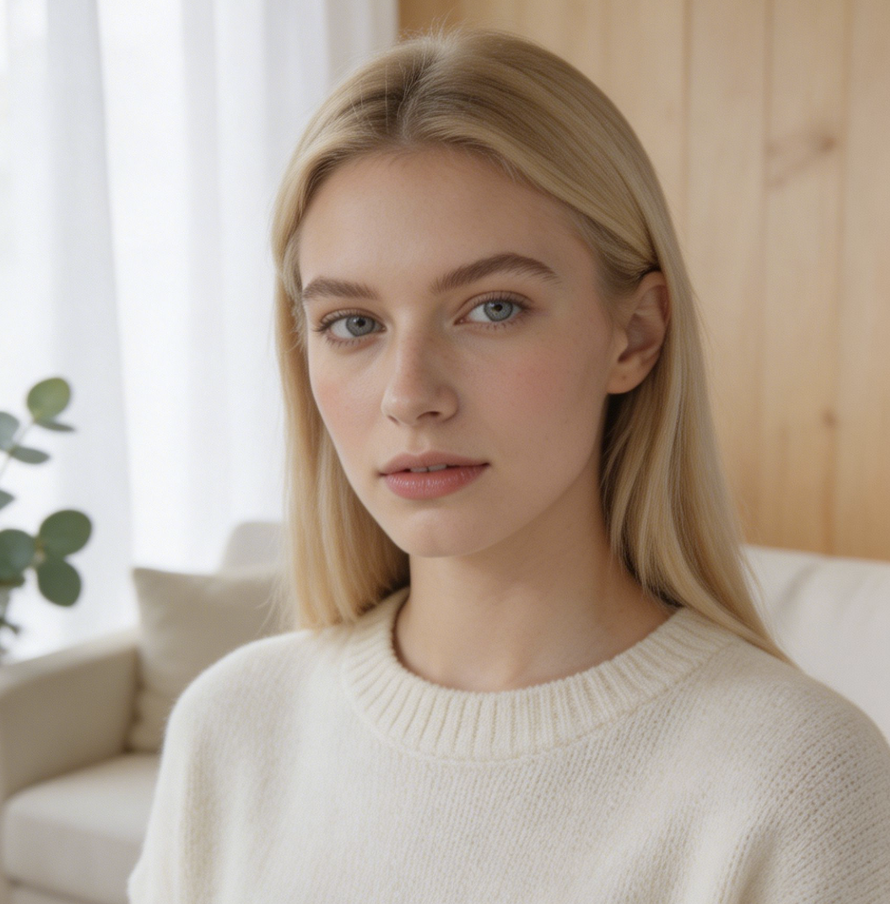
Use AI Blonde Hair Filter to turn one uploaded portrait into a polished blonde hair preview. The Blonde Hair AI Filter keeps attention on your face, hairstyle, and natural texture while showing a believable lighter color direction.

How to Use AI Blonde Hair Filter
The workflow keeps AI Blonde Hair Filter simple: upload a clear image, use the Blonde Hair AI Filter model, then compare the original portrait with a realistic blonde hair result before deciding what to keep.

Upload Photos
Start with a well-lit selfie, headshot, or social photo where the hair is visible. AI Blonde Hair Filter reads the existing shape, length, and lighting so the generated blonde result follows the original portrait instead of replacing it.

Generate with AI
Run AI Blonde Hair Filter and let the model create a corresponding blonde hair image from your upload. It adjusts tone, highlights, shadow, and strand detail while keeping the face, pose, expression, and background aligned with the source.

Compare Results
Review the before and after result, decide whether the blonde direction suits your face, and save the version you like. AI Blonde Hair Filter works as a practical Blonde Filter for personal previews, profile images, and style planning.
Best AI Image Tools for Creative Projects
Explore creative tools for image, learn tips and tricks, and see how AI can be your assistant in turning concepts into finished projects.












Features of AI Blonde Hair Filter
AI Blonde Hair Filter focuses on realistic transformation, identity preservation, and useful before-and-after comparison. It gives the Blonde Hair AI Filter experience structure, so each generated image feels specific to the uploaded portrait.

Natural AI Blonde Hair Filter Preview
- AI Blonde Hair Filter turns your current photo into a realistic blonde hair preview instead of a flat color overlay.
- Use AI Blonde Hair Filter when you want to test honey blonde, soft golden blonde, or a brighter salon-inspired look before making a real change.
- Use the preview as a mood check, then compare it with your original photo to judge contrast, warmth, and overall balance.

AI Blonde Hair Filter Identity Preservation
- A good Blonde Hair AI Filter should not change who is in the picture.
- AI Blonde Hair Filter is guided to preserve facial features, expression, head angle, clothing, and background while changing only the hair color direction.
- This makes the Blonde Filter useful for profile photos, creator posts, and style boards where recognition matters as much as the new shade.

AI Blonde Hair Filter Highlights and Shadow
- AI Blonde Hair Filter treats blonde hair as a full lighting problem, not a single yellow tint.
- It can suggest lighter ends, softer highlights, darker root depth, and natural shadow transitions that follow the original scene.
- With AI Blonde Hair Filter, the generated result looks closer to a real hair color preview than a sticker placed on top of your photo.

AI Blonde Hair Filter Style References
- Use AI Blonde Hair Filter to create a visual reference before talking with a stylist, updating a profile, or trying a new aesthetic.
- The result can show whether warm blonde, creamy blonde, or brighter blonde contrast works with your features.
- AI Blonde Hair Filter helps you communicate a direction clearly without relying only on inspiration photos of other people.
Why Choose AI Blonde Hair Filter
AI Blonde Hair Filter is built for people who want a believable blonde preview from their own uploaded image. It combines the practicality of a Blonde Filter with more careful photo-to-photo generation.

Test Before a Salon Visit
Before booking color work, use AI Blonde Hair Filter to understand how a lighter shade might sit against your complexion and current haircut. A realistic preview helps narrow the conversation with a stylist, especially when you are deciding between subtle warmth and a brighter blonde statement. It gives the discussion a concrete visual anchor.
Refresh Profile Photos
Creators, students, and professionals can use AI Blonde Hair Filter to test a fresh look for profile photos without reshooting everything. The Blonde Filter approach keeps the portrait familiar while letting the hair color carry a new mood for social, dating, or portfolio images. That saves time when you are comparing several visual directions.

Explore Blonde Directions
Different blonde tones can change how eyes, brows, and skin read in a photo. AI Blonde Hair Filter helps you compare softer golden warmth, neutral beige blonde, or cooler light blonde ideas before committing to one direction or asking for professional color advice. The comparison can reveal which tone feels most natural.

Create Personal Style Boards
When building a style board, inspiration images can feel disconnected from your own face. AI Blonde Hair Filter gives you a generated result based on your portrait, making it easier to collect references that reflect your features, wardrobe, and preferred visual tone. This keeps the board personal instead of purely aspirational.

Plan Content Looks Faster
For photo concepts, thumbnails, and campaign drafts, AI Blonde Hair Filter lets you test a blonde direction before arranging makeup, lighting, or wardrobe. The Blonde Hair AI Filter result can guide creative planning while keeping the original portrait as the visual anchor. It also helps teams align on the intended color mood.

Compare a Subtle Change with a Bold One
A small color lift and a dramatic blonde transformation can communicate very different personalities. AI Blonde Hair Filter gives you a clear before-and-after result that helps compare the mood of each option before you share, save, or recreate the look offline. The side-by-side view keeps the decision practical and visual.
What Users Say About AI Blonde Hair Filter
People use AI Blonde Hair Filter for salon planning, creator images, personal style boards, and quick color exploration. Their feedback centers on realistic previews, recognizable faces, and practical before-and-after comparison.
I wanted to see whether blonde would wash me out before my appointment. AI Blonde Hair Filter gave me a clear preview that looked like my actual photo, not a random makeover, so I could talk through options more confidently. It made the appointment feel less uncertain.
The best part was that my face and hair shape stayed recognizable. AI Blonde Hair Filter helped me compare a warmer blonde with my usual brunette look, and the Blonde Filter result was easy to share with my stylist. That small proof point changed the conversation.
I make beauty mood boards for clients, and AI Blonde Hair Filter is useful when someone wants to understand the direction before choosing reference photos. It turns a vague idea into something specific enough to discuss. Clients understand the color idea much faster.
I used AI Blonde Hair Filter for profile photo planning because I was changing my overall style. The preview kept my expression and background intact, so the hair color was the only thing I had to evaluate. That made the planning process cleaner.
A lot of hair color apps look painted on. AI Blonde Hair Filter gave a softer result with highlights and shadows, which made it easier to decide whether a lighter shade matched my skin tone. The comparison gave me useful confidence.
I needed a quick creative reference for a shoot concept. AI Blonde Hair Filter helped me test the blonde idea on the actual portrait, so wardrobe and makeup choices felt more grounded from the start. The concept was easier to explain visually.


FAQs About AI Blonde Hair Filter
These answers explain how AI Blonde Hair Filter turns an uploaded portrait into a blonde hair preview, what kind of photos work best, and how to use the result responsibly.
AI Blonde Hair Filter is an image editing tool that takes an uploaded portrait and generates a corresponding blonde hair version. Instead of only tinting pixels, it should interpret the original hairstyle, lighting, face shape, and visible texture. The result from AI Blonde Hair Filter is meant to help you preview a blonde direction before a real salon change or creative edit.
The AI Blonde Hair Filter tool starts from your uploaded image, then the Blonde Hair AI Filter model identifies the hair area and creates a blonde transformation that matches the source portrait. AI Blonde Hair Filter should preserve identity, pose, expression, and background while changing hair color. A good result balances highlights, root depth, shadows, and strand detail so the blonde version looks connected to the photo.
AI Blonde Hair Filter works best with clear portraits where the hair is visible and the face is not heavily blocked. Soft daylight, indoor studio light, or a clean phone photo can all work well. For better Blonde Filter results, avoid extreme blur, heavy hats, cropped hair, or strong color lighting that hides the original hairline and texture. for cleaner edges.
Yes. You can use AI Blonde Hair Filter to explore a subtle warm blonde, a brighter golden result, or a cooler light blonde direction depending on the source image and model behavior. The Blonde Hair AI Filter output is a visual preview, so treat it as creative guidance rather than a guaranteed salon formula or dye prescription. with realistic expectations.
AI Blonde Hair Filter is designed around portrait consistency, so the generated image should keep your facial features, angle, expression, clothing, and background as stable as possible. Any AI edit can vary with image quality, so use a clear source photo. If the first Blonde Filter result feels too strong, try another source image with simpler lighting. for stronger consistency.
Use AI Blonde Hair Filter before a salon visit when you need a visual starting point. It can show whether blonde suits your face and current style, but it does not replace professional color consultation. Bring the AI Blonde Hair Filter result as a conversation aid, then let a stylist consider hair history, condition, undertone, and maintenance. and upkeep expectations.
A simple Blonde Filter may only place a yellow or light overlay on top of the image. AI Blonde Hair Filter is positioned as a model-based transformation that generates a corresponding blonde hair picture from the uploaded portrait. That makes AI Blonde Hair Filter more useful when you want realistic hairline, highlight, shadow, and texture behavior. and believable depth.
You can use the generated result from AI Blonde Hair Filter for personal previews, mood boards, social concepts, and style planning. For important public or commercial use, review the final image carefully and follow the terms of the product you publish with. The AI Blonde Hair Filter result should be treated as an edited image, not an untouched photograph. for context.
Try AI Blonde Hair Filter Today
Upload a portrait and let AI Blonde Hair Filter generate a realistic blonde hair version you can compare, save, and use as a clear reference for your next look.
