
Upload any photo, describe which person to remove, then click generate.
More AI Image Generators
Explore our collection of specialized AI image generators designed for different creative needs and styles




















Remove People from Pictures Instantly with AI
Upload any image and let BananaPro AI Remove People from Pictures tool remove crowds, strangers, passersby, or one selected subject in seconds with a clean and natural result.
BananaPro AI helps you remove people from pictures in one click. Whether you want to remove people from pictures for travel shots, product photos, street scenes, or personal memories, this tool gives you a fast and natural result. You can remove people from pictures by deleting one subject, a group, or all visible people. If you want to remove people from photos without complex editing, BananaPro AI is built for that exact need. You can also remove a person from a photo by describing the position, such as left, center, right, foreground, or background.
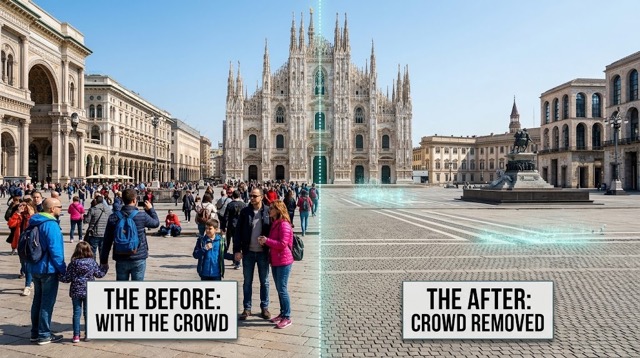
How to Use Our AI Tool to Remove People from Pictures
BananaPro AI Remove People from Pictures tool keeps the workflow simple. If you want to remove people from pictures or remove people from photos without Photoshop, just upload, describe, and generate. If you only want to remove a person from a photo instead of clearing the whole scene, the prompt based setup gives you more control.

Upload Your Photo
Upload any JPG or PNG image to start. BananaPro AI is designed to remove people from pictures from travel photos, portraits, product shots, outdoor scenes, and casual snapshots. If you need to remove people from photos quickly, just drag and drop your file.

Describe Who to Remove
Tell the AI Remove People from Pictures tool what to delete. You can remove a person from a photo by writing prompts like remove the person on the left, remove the person in the background, or remove all people. This flexible workflow makes it easy to remove people from pictures with precise control.

Generate and Download
Click generate and let BananaPro AI remove people from pictures automatically. The tool reconstructs the missing area to keep the scene realistic. When you need to remove people from photos for social posts, ecommerce, design drafts, or personal albums, you can download the edited image in seconds.
Best AI Image Tools for Creative Projects
Explore creative tools for image, learn tips and tricks, and see how AI can be your assistant in turning concepts into finished projects.











Features of Our AI Tool to Remove People from Pictures
BananaPro AI is built for users who want to remove people from pictures, remove people from photos, and remove a person from a photo without manual retouching. It combines flexible prompt control, realistic background fill, and a fast online workflow.

Remove One Selected Subject with Position Prompts
- BananaPro AI lets you remove a person from a photo with simple instructions.
- You can type remove the person on the left, remove the person in the center, or remove the person in the background.
- This is useful when you want to remove people from pictures but keep the main subject untouched.
- If your goal is to remove people from photos with more precision, this targeted workflow is ideal.
Remove All Unwanted People from Busy Scenes
- Use BananaPro AI to remove people from pictures taken in tourist spots, streets, beaches, museums, and event venues.
- When you need to remove people from photos full of strangers or passersby, the AI cleans the background and fills the empty area naturally.
- You can remove people from pictures for cleaner compositions, stronger product focus, and more polished social content.
- It is also a fast way to remove a person from a photo when that person distracts from the scene.
Keep Backgrounds Natural After Removal
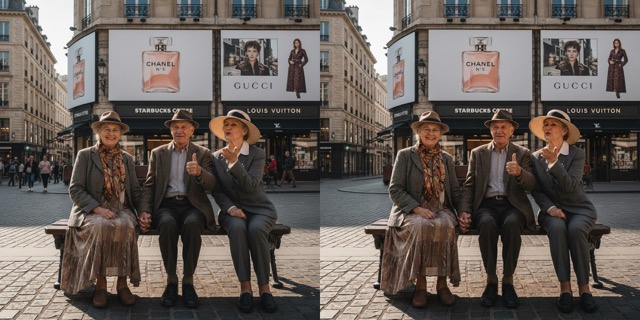
- A good tool does more than remove people from pictures. It also rebuilds the missing area with matching texture, lighting, and perspective.
- BananaPro AI helps you remove people from photos while keeping the final image realistic.
- If you want to remove a person from a photo near walls, roads, water, trees, or interiors, the AI works to make the edit look seamless.
- This makes BananaPro AI a practical choice for everyday cleanup and content creation.
Fast Online Editing for Daily Use
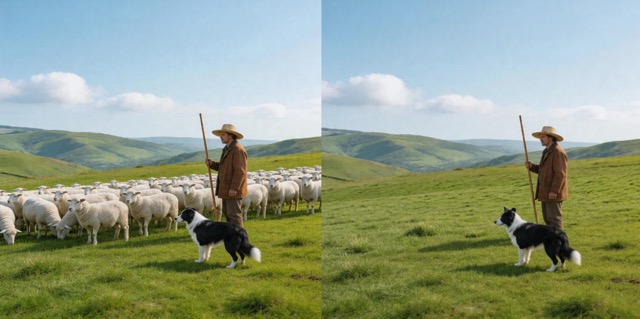
- BananaPro AI makes it easy to remove people from pictures online without downloading complex software.
- If you often need to remove people from photos for posts, listings, presentations, or client drafts, this one click workflow saves time.
- You can remove a person from a photo, remove groups, or remove all people depending on your prompt.
- The tool is simple enough for casual users and fast enough for creators and marketers.
Why Choose BananaPro AI to Remove People from Pictures
BananaPro AI Remove People from Pictures tool is designed for speed, control, and natural results. Whether you need to remove people from pictures for personal memories or remove people from photos for work, the tool makes the process much easier.

Clean Travel Photos
Tourist locations are often crowded. BananaPro AI helps you remove people from pictures so landmarks, scenery, and personal moments stand out. If you want to remove people from photos from vacations, city walks, or scenic viewpoints, this tool is a simple fix.

Improve Product and Real Estate Images
Sellers and marketers often need to remove people from pictures to keep attention on products, interiors, booths, or staging. You can remove people from photos used for listings, ecommerce, and promotional design to create a cleaner visual focus.

Fix Social Media Content
Sometimes one stranger ruins a great shot. BananaPro AI lets you remove a person from a photo before posting to Instagram, TikTok, blogs, or portfolios. It is a fast way to remove people from pictures without reshooting the image.

Keep the Main Subject Only
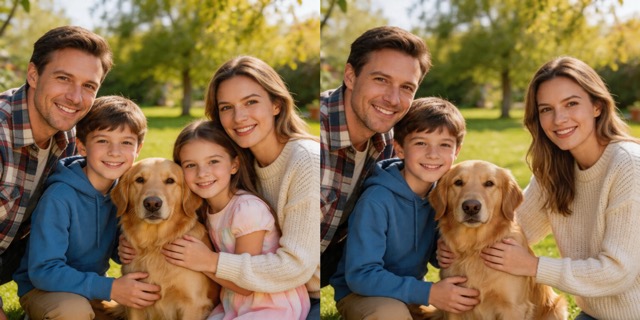
If the photo includes random bystanders, you can remove people from photos while protecting the main subject. This is especially useful for portraits, street photography, and family shots where you need to remove a person from a photo but keep everyone else unchanged.

Choose One Person or All People
BananaPro AI supports different cleanup goals. You can remove a person from a photo by position, remove several people, or remove all people from the image. This control makes it easier to remove people from pictures in a way that fits each photo.

No Manual Selection Needed
Instead of drawing masks by hand, you can describe the unwanted subject with words. That means you can remove people from pictures and remove people from photos more efficiently. For many users, this is the easiest way to remove a person from a photo online.
What Users Say About Our Tool to Remove People from Pictures
Creators, marketers, photographers, and everyday users choose BananaPro AI when they need to remove people from pictures, remove people from photos, or remove a person from a photo with less effort.
I used BananaPro AI to remove people from pictures from my trip to Rome. The landmarks looked much cleaner, and the edits were fast enough for my travel blog workflow.
Our team needed to remove people from photos from a storefront shoot. BananaPro AI helped us clean the frame and keep attention on the products without extra retouching time.
I only needed to remove a person from a photo standing behind my subject. The position prompt worked better than I expected, and the background still looked natural.
BananaPro AI made it easy to remove people from pictures for my apartment listing images. I could present the space clearly without random visitors in the frame.
I often remove people from photos before posting brand content. This tool saves time, and I like that I can remove one subject or clear a busy background depending on the image.
The best part for me was being able to remove a person from a photo with a simple text instruction. I did not need complicated tools, and the final image looked polished.




Frequently Asked Questions About Remove People from Pictures Tool
Learn how BananaPro AI helps you remove people from pictures, remove people from photos, and remove a person from a photo with better speed, control, and convenience.
To remove people from pictures with AI means uploading an image and letting the model detect and erase unwanted subjects while rebuilding the missing area naturally. BananaPro AI helps users remove people from pictures without manual retouching, making the process faster for both casual and professional editing.
Yes. BananaPro AI lets you remove a person from a photo by describing that subject with a simple prompt. You can write remove the person on the left, remove the person in the background, or remove the person closest to the camera. This makes it easier to remove people from photos with precise control.
Yes. Many users come to BananaPro AI specifically to remove people from pictures taken in crowded places. If you want to remove people from photos from tourist spots, beaches, streets, or public events, the tool can help clean the scene and keep the main subject or landmark more visible.
That is the goal of the tool. BananaPro AI does more than delete a subject. It also tries to reconstruct the removed area using nearby textures, colors, perspective, and lighting. Whether you remove people from pictures with walls, roads, plants, sky, or indoor objects, the AI aims for a seamless result.
Yes. Users often remove people from photos for product listings, real estate images, social content, presentations, ad drafts, and marketing materials. If you need to remove a person from a photo quickly and keep the composition clean, BananaPro AI is a practical online option.
Manual editing usually takes more time and skill. BananaPro AI lets you remove people from pictures with a much simpler workflow. You can remove people from photos or remove a person from a photo using text prompts, which is faster for many everyday editing needs.
Remove People from Pictures in Seconds
Use BananaPro AI to remove people from pictures, remove people from photos, or remove a person from a photo with a fast online workflow and natural looking results.
