
Upload your photo and type what you want to recolor, such as a shirt, handbag, and product package.
More AI Image Generators
Explore our collection of specialized AI image generators designed for different creative needs and styles







AI Color Changer
Change Color of Image Online with Smart Palettes
BananaPro AI color changer helps you upload any image, choose a ready-made color palette, create a custom color combination, and generate a fresh visual in seconds. Whether you want to change color of image for product photos, fashion concepts, posters, social media graphics, interior previews, or creative artwork, this AI color changer makes color editing simple and flexible. Instead of manually masking, selecting, and repainting every area, you can change the color of an image with a guided image to image workflow. Select your preferred palette, choose the number of results, pick 1K or 2K clarity, and let the AI color changer rebuild the image with a new color direction while keeping the core subject recognizable.
How to Use AI Color Changer
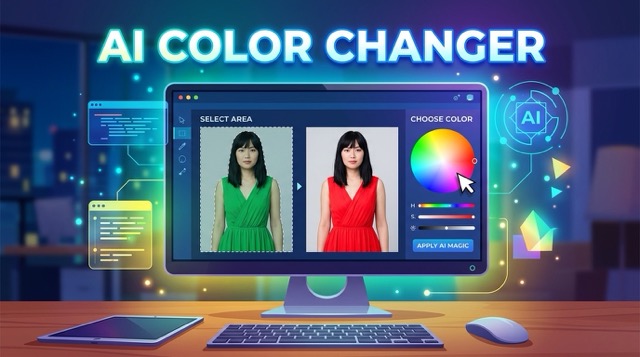
BananaPro AI makes it simple to change the color of an image. Upload a picture, describe the specific part you want to recolor, choose a default palette or custom color combination, set basic parameters like output quantity and 1K or 2K clarity, then generate and download your new image with the AI color changer.

Upload Your Image
Start by uploading the image you want to recolor. BananaPro AI color changer supports an easy image to image workflow, so you can use product photos, portraits, room photos, clothing shots, packaging images, digital art, or social media graphics. The AI color changer analyzes the original visual structure and prepares it for color transformation, making it easier to change color of image without rebuilding the whole design from scratch.

Describe What You Want to Change
Enter the specific area or object you want to recolor, such as the dress, wall, sofa, bottle label, product package, background, logo element, or accessory. This helps the AI color changer understand where the color update should happen. When you clearly describe the part you want to edit, it becomes easier to change the color of an image while keeping other important details closer to the original.

Choose Colors and Basic Settings
Pick a default color palette or create your own custom color combination, then choose basic generation settings such as output quantity and image clarity. You can use the AI color changer to test warm tones, cool tones, brand colors, seasonal palettes, pastel looks, luxury colors, or minimalist color systems. Select 1K for fast previews or 2K for sharper results when you need to change color of image for polished visual use.

Generate and Download
Click generate and let BananaPro AI color changer create new image results based on your uploaded picture, target edit area, selected colors, and quality settings. Review the outputs, compare different versions, keep the best one, and download the final image. You can also change the color of an image again with another palette or custom color combination until the result matches your creative direction.
Best AI Image Tools for Creative Projects
Explore creative tools for image, learn tips and tricks, and see how AI can be your assistant in turning concepts into finished projects.

















Features of AI Color Changer
BananaPro AI color changer is designed for flexible color transformation. Use default palettes, custom color combinations, multiple generation options, and 1K or 2K quality to change color of image for different creative, commercial, and branding needs.
Default Color Palettes for Fast Recoloring
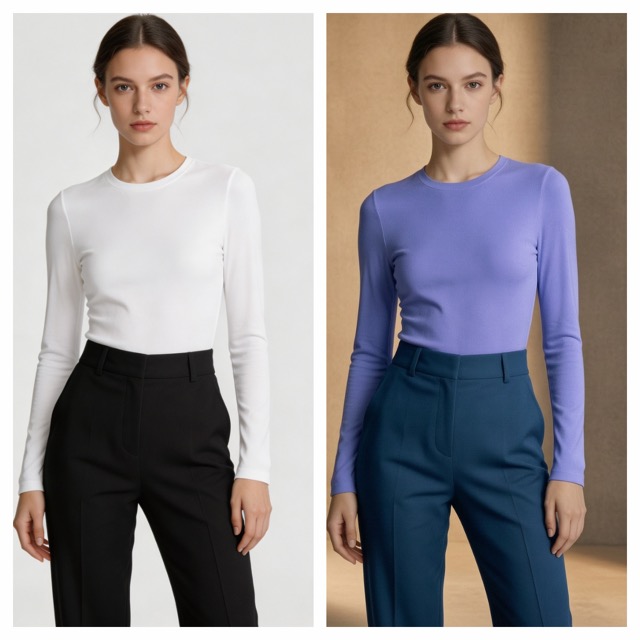
- BananaPro AI color changer gives users ready-made color palettes for quick image recoloring.
- Use the AI color changer when you want to change color of image without writing a complex prompt or editing layers manually.
- Default palettes help you explore modern, soft, bold, commercial, elegant, seasonal, and creative visual directions.
- This is useful for ecommerce photos, fashion previews, packaging drafts, social media posts, posters, and lifestyle visuals.
- When you need to change the color of an image quickly, a default palette can provide instant creative direction and reduce decision time.
- The AI color changer keeps the workflow simple: upload, tell the specific location, select palette, choose output quality, and generate.
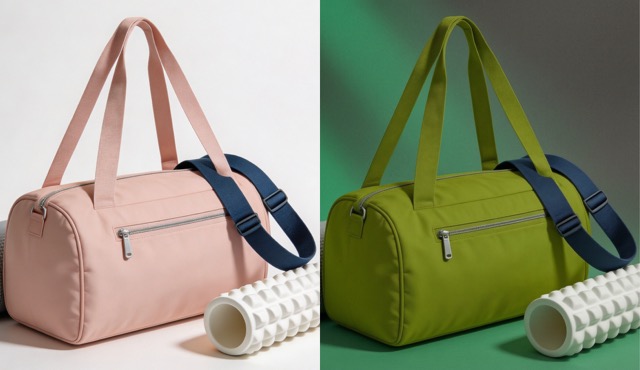
Custom Color Combinations for Brand Control
- The AI color changer also supports custom color combinations for users who need more control.
- If you want to change color of image based on a brand palette, campaign theme, product line, or visual identity, custom colors make the result more intentional.
- You can guide the image toward luxury gold, clean white, soft beige, cyber blue, vivid red, pastel pink, natural green, or any color system you prefer.
- This helps designers, sellers, marketers, and creators change the color of an image while staying close to brand requirements.
- BananaPro AI color changer is especially useful for testing color concepts before creating final ads, thumbnails, mockups, or product images.
- With custom colors, the AI color changer becomes a practical tool for visual planning, not just casual editing.
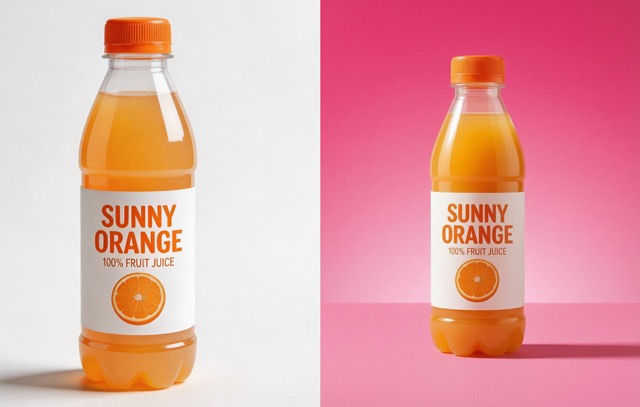
Image to Image Color Editing Without Manual Masking
- Traditional recoloring often requires selections, masks, layers, brush work, and repeated corrections.
- BananaPro AI color changer simplifies the process by using an image to image workflow.
- Upload your original image and let the AI color changer interpret the subject, background, lighting, and color relationship.
- This makes it easier to change color of image for people who do not have professional editing experience.
- Use it to change the color of an image while preserving the visual idea, composition, and overall structure.
- The workflow is useful for quick experiments, client previews, product testing, creative drafts, and social content production.
- Instead of spending hours on manual edits, use the AI color changer to explore multiple color directions faster.

Multiple Results with 1K and 2K Output Options
- BananaPro AI color changer lets you choose how many images to generate, so you can compare different visual outcomes.
- When you change color of image, one result may look commercial, another may look artistic, and another may be closer to your brand direction.
- Multiple outputs help you evaluate palettes before committing to one final look.
- You can also select 1K or 2K clarity depending on your use case.
- Use 1K for fast previews, concept testing, and casual social images.
- Use 2K when you need sharper detail for product pages, design presentations, ads, and polished content.
- The AI color changer gives creators a more flexible way to change the color of an image for both draft and final workflows.
Why Choose BananaPro AI Color Changer
BananaPro AI color changer helps users change color of image for practical design and creative exploration. From product colorways to social visuals, the AI color changer offers a fast way to change the color of an image with palette control and quality options.

Product Color Variations
Use AI color changer to create product color variations for ecommerce previews, catalog tests, and marketing concepts. Sellers can change color of image for bags, bottles, furniture, shoes, accessories, packaging, and small goods. Instead of arranging a new photoshoot for every colorway, upload one image and change the color of an image with selected palettes or custom colors.

Fashion and Outfit Recoloring
Fashion creators can use BananaPro AI color changer to test new clothing tones, seasonal palettes, and outfit ideas. Change color of image for dresses, jackets, shirts, bags, shoes, and accessories. The AI color changer helps stylists and content creators change the color of an image before preparing lookbooks, social posts, campaign drafts, or product collections.

Interior and Home Style Preview
Use AI color changer to explore room color ideas, furniture tones, wall palettes, and decor moods. You can change color of image for interior photos and test modern beige, warm wood, black and white, pastel, luxury, or natural color styles. This makes it easier to change the color of an image before deciding on a real design direction.

Social Media Visual Refresh
Creators can use the AI color changer to refresh old visuals and create new post styles. Change color of image for Instagram posts, TikTok covers, Pinterest pins, YouTube thumbnails, banners, and campaign graphics. When you change the color of an image with a new palette, the same visual can feel more seasonal, trendy, branded, or eye-catching.

Brand Campaign Color Testing
Marketing teams can use BananaPro AI color changer to test campaign color systems before launching ads. Upload a design draft, choose brand colors, and change color of image to compare different campaign moods. The AI color changer helps teams change the color of an image for A/B visual testing, ad direction, landing page assets, and seasonal promotions.

Creative Art and Mood Exploration
Artists and designers can use AI color changer for mood exploration. Change color of image to create cinematic, dreamy, futuristic, vintage, dramatic, pastel, or fantasy-inspired looks. When you change the color of an image through palette-based control, it becomes easier to explore visual emotion, atmosphere, and creative identity without starting over.
What Users Say About AI Color Changer
Designers, marketers, ecommerce sellers, creators, and visual consultants use BananaPro AI color changer to change color of image, test color palettes, and change the color of an image for faster creative decisions.
I used BananaPro AI color changer to create different color versions of a skincare bottle. It helped me change color of image for a client presentation without arranging another product shoot. The 2K result looked clean enough for concept review.
The custom color option is the reason I kept using this AI color changer. I needed to change the color of an image based on our campaign palette, and the workflow was much faster than manual editing.
For fashion previews, BananaPro AI color changer helped me test jacket and bag colors before preparing content. I could change color of image several times and compare the outputs with my team in one session.
I work on social media visuals, and this AI color changer is useful when an old image needs a fresh style. I can change the color of an image with a warmer palette or a more dramatic palette depending on the platform.
I used the AI color changer for interior color previews. It helped me change color of image for furniture and wall mood tests. The default palettes gave me quick ideas, and the custom colors made the result more specific.
BananaPro AI color changer saved time during product concept exploration. I uploaded one product image, selected different palettes, and generated multiple options. It made it easier to change the color of an image before choosing a final direction.



Frequently Asked Questions About AI Color Changer
Learn how BananaPro AI color changer works, how to change color of image with palettes or custom colors, and how to change the color of an image in 1K or 2K quality.
BananaPro AI color changer is an image to image tool that helps users upload a picture and transform its color style with default palettes or custom color combinations. You can use the AI color changer to change color of image for products, fashion items, interiors, posters, digital art, social media visuals, and brand concepts. It is designed to make color editing easier without manual masking or complex software.
To use the AI color changer, upload your image, tell the specific location you want to recolor, select a default palette or create a custom color combination, choose how many outputs you want, and select 1K or 2K clarity. Then generate the result. This workflow helps you change color of image quickly and compare different color versions. It is a direct way to change the color of an image for both casual and professional visual needs.
Yes. BananaPro AI color changer supports custom color combinations. If you want to change the color of an image with brand colors, seasonal tones, product palette ideas, or a specific creative direction, custom colors give you better control. This makes the AI color changer useful for ecommerce, marketing, branding, and design concept testing.
The AI color changer can be used for many image types, including product photos, fashion images, portraits, interior photos, packaging visuals, social media graphics, posters, digital artwork, and creative mockups. If you want to change color of image while keeping the main visual idea, BananaPro AI color changer provides a simple upload and generate workflow.
BananaPro AI color changer provides 1K and 2K clarity options. Use 1K when you need fast previews, quick ideas, or early color tests. Choose 2K when you want sharper details for product previews, marketing materials, content drafts, or design presentations. Both options help you change the color of an image with different workflow priorities.
BananaPro AI color changer is useful for ecommerce sellers, designers, marketers, fashion creators, social media managers, interior stylists, artists, and anyone who wants to change color of image without complicated editing. It helps users change the color of an image for product testing, brand campaigns, creative exploration, and visual refreshes.
Start Recoloring Images with AI Color Changer
Upload any image, choose a default palette or custom color combination, select the number of outputs, and generate in 1K or 2K clarity. BananaPro AI color changer helps you change color of image faster, compare creative directions, and change the color of an image for products, designs, campaigns, and social content.
